This is a companion to our OpenClaw teardown. It is for anyone who wants to build voice on top of an iMessage-based agent and has to decide where it all runs. Part 1 covers every voice surface OpenClaw ships, down to audio formats, session keys and the experimental FaceTime plugin that injects into Apple’s apps. Part 2 covers hosting: what the Gateway needs, 19 documented places to run it, the Mac side for iMessage and FaceTime, what the docs support for many users, and a recommended topology that is clearly labelled as ours. Everything was read from docs.openclaw.ai, the repository and its issues on 1 October 2026, at version 2026.9.7.
First principles
Voice is a real-time stream, and an agent turn is not. Call audio arrives in small frames, 20 ms each on phone lines, and has to keep flowing in both directions. A full agent turn with tools and memory takes far longer than one frame. So every live voice surface below splits the work: a fast speech model holds the conversation, and it consults the slower agent only when it needs tools, memory or current information.
Every audio path is a chain of conversions. Phone carriers deliver 8 kHz G.711 mu-law. The speech models expect 24 kHz 16-bit pulse-code modulation (PCM). FaceTime’s virtual audio devices run at 48 kHz. Each hop converts and buffers, and every buffer is audio that has to be thrown away when the caller interrupts. That is why each surface below has its own barge-in handling.
What Apple exposes decides what needs a Mac. OpenClaw reaches Messages and FaceTime through the apps of a signed-in Mac user, not through a service it can call from anywhere. iMessage therefore needs a Mac signed in to Messages. FaceTime needs more: private application programming interfaces (APIs), a helper injected into Apple’s call apps, and reduced System Integrity Protection (SIP) on a Mac you control. Phone calls arrive through carriers’ public webhooks, so they need no Mac at all.
A Gateway is one trust boundary. It holds one set of state, credentials and channel accounts. Users who do not trust each other cannot share one, so serving many customers means running many Gateways. Hosting then becomes a question of how many Gateways run on which hosts.
So the hardware splits in two. Linux hosts can carry the Gateways and phone voice. Macs are needed only for what Apple’s software does, and FaceTime also pulls its Gateway onto the Mac. Part 2 is about keeping those two kinds of machine apart and still connected.
Part 1: voice and FaceTime
Research date: 2026-10-01. Subject version: OpenClaw 2026.9.7 (published 2026-09-30). Sources: the live docs at docs.openclaw.ai, the openclaw/openclaw repo at commit a1273632 (main, 2026-10-01), the openclaw/openclaw-facetime repo, the GitHub releases API and the npm registry. Every claim below points to a source in the Sources section. Where the docs say nothing, this page says so.
Summary
- OpenClaw has five voice surfaces: phone calls through the Voice Call plugin; Talk mode on Mac, iPhone, Watch, Android and browser; wake word and push to talk; voice notes on chat channels; and an experimental FaceTime plugin.
- FaceTime is real but experimental. The FaceTime plugin shipped in v2026.9.6 (2026-09-23) and is disabled by default.
- It answers and places one-to-one FaceTime Audio calls. It does this by injecting a helper dynamic library (dylib) into Apple’s FaceTime and Phone apps with the LLDB debugger. That needs SIP debugging restrictions turned off.
- FaceTime call audio is captured with a Core Audio process tap. The agent’s voice goes back through a virtual mic built from BlackHole (
OpenClaw-Mic/OpenClaw-Feed). Both directions use 24 kHz 16-bit mono PCM. - The phone path is the Voice Call plugin, inside the Gateway process. Carriers are Twilio, Telnyx and Plivo, plus a mock provider. It has existed since v2026.1.11 (January 2026).
- Phone calls have two audio modes. Realtime mode is a full duplex speech-to-speech model: OpenAI Realtime, GPT-Live or Gemini Live. Streaming mode is speech to text, then the agent, then text to speech. Only one mode can be active.
- Carrier audio is G.711 mu-law at 8 kHz in 20 ms frames of 160 bytes. It is converted to and from the model’s 24 kHz PCM.
- For both phone and FaceTime, a fast voice model handles the talk. It calls the full OpenClaw agent through an
openclaw_agent_consulttool when it needs tools, memory or current information. - iMessage is text and attachments through
imsg, which speaks JavaScript Object Notation remote procedure calls (JSON-RPC) over standard input and output. Agent audio replies to iMessage are converted to Opus audio in a Core Audio Format (CAF) file withafconvert, so they arrive as native voice memos. Inbound voice memos are transcribed by the shared audio pipeline. - The latest voice work was GPT-Live for Talk, meetings and calls (v2026.9.5) and FaceTime Audio (v2026.9.6). v2026.9.7 changed how voice models consult the agent about its other work.


What shipped and when
Release dates come from the GitHub releases API. Content comes from the CHANGELOG files and release pages.
| Version | Published (UTC) | Voice content |
|---|---|---|
| v2026.1.11 | 2026-01-12 | Plugins become first-class. “the new Voice Call plugin”, Twilio plus a log provider, start and status remote procedure calls (RPC), a command-line interface (CLI) and a tool. |
| v2026.1.12 | (not fetched) | “restore full voice-call plugin parity (Telnyx/Twilio, streaming, inbound policies, tools/CLI)”. |
| v2026.7.1 | 2026-07-13 | Voice Call section. Calls keep the starting agent’s identity. Barge-in for OpenAI and Google realtime calls flushes buffered phone audio. Twilio regions US1/IE1/AU1. Webhook replay dedupe. |
| v2026.9.4 | 2026-09-11 | “Keep talking while your Claw delegates work”. Talk keeps listening while another agent works, then speaks the result. Deepgram Flux for voice notes. |
| v2026.9.5 | 2026-09-19 | “Use GPT Live in Talk, meetings and calls”. GPT-Live can consult the agent during phone calls. Voice switching during Talk and Discord calls. |
| v2026.9.6 | 2026-09-23 | “Experimental FaceTime Audio”: one-to-one audio conversations with the configured agent (pull request #119291, merged 2026-09-20). Also Android realtime Talk fixes. |
| v2026.9.7 | 2026-09-30 | Talk, Discord, FaceTime and Voice Call now guide the voice model to consult the agent about its other work. Voice Call loads again on 2026.9.6. Gemini 3.8 Live and Grok Talk fixes. Browser Talk survives brief stalls. |
The FaceTime docs disagree with the changelog. The docs page says “OpenClaw 2026.9.4 or later”. The v2026.9.6 changelog says it needs “OpenClaw 2026.9.6”. The pull request merged on 2026-09-20, after v2026.9.5 shipped, so 2026.9.6 is the practical minimum.
When v2026.9.6 shipped, its changelog said “Matching plugin and native distribution availability remains unconfirmed.” Both are now published:
- npm
@openclaw/facetime(first real version 2026.9.6, latest 2026.9.7). openclaw/openclaw-facetimenative releases v0.1.0 (2026-09-16) through v0.1.3 (2026-09-22).- The Homebrew formula
openclaw-facetime.rbinopenclaw/homebrew-tap.
Voice calls (telephony)
What it is. @openclaw/voice-call is a plugin that runs inside the Gateway process. It places outbound calls and accepts inbound calls through:
- Twilio: Programmable Voice plus Media Streams.
- Telnyx: Call Control v2.
- Plivo: Voice API plus Extensible Markup Language (XML) transfer plus GetInput speech.
mock: no network, for development.
The plugin hosts its own webhook server. The defaults are port 3334 and path /voice/webhook. For Twilio, Telnyx and Plivo, the webhook must resolve to a public URL. Setup fails if publicUrl resolves to loopback or private address space. Exposure options are a stable publicUrl, an ngrok tunnel, or Tailscale Serve/Funnel. Tailscale also exposes the media WebSocket path.
Two audio modes. Only one can be enabled.
- Realtime (
realtime.enabled): a full duplex speech-to-speech model. Supported on Twilio and Telnyx only.- Bundled realtime providers are Google Gemini Live (default model
gemini-3.1-flash-live-preview, voiceKore) and OpenAI (defaultgpt-realtime-2.1, voicealloy, plus GPT-Livegpt-live-1andgpt-live-1-codex). - The model gets two built-in tools.
openclaw_end_callhangs up.openclaw_agent_consultruns the full OpenClaw agent. - GPT-Live does not use function tools. It delegates natively, so on GPT-Live
openclaw_end_calland customrealtime.toolsare not available.
- Bundled realtime providers are Google Gemini Live (default model
- Streaming (
streaming.enabled): Twilio Media Streams audio goes to a streaming speech-to-text provider. Supported on Twilio only.- Providers are Deepgram, ElevenLabs, Mistral, OpenAI (default
gpt-4o-transcribe, silence 800 ms, voice activity detection (VAD) 0.5) and xAI (mulaw, 8000 Hz, endpointing 800 ms). - The transcript drives a classic agent turn. The reply is spoken through core
ttsconfig.
- Providers are Deepgram, ElevenLabs, Mistral, OpenAI (default
- Neither mode: Twilio uses
<Gather input="speech" speechTimeout="auto">, so Twilio does the speech recognition, and “calls fall back to provider-native voices”. In source, notify mode maps the configured voice to an Amazon Polly voice inside inline<Say>Twilio Markup Language (TwiML).
Media formats (verified in source).
- Twilio and Telnyx streams carry base64 G.711 mu-law at 8 kHz. The pacer sends 160-byte chunks (20 ms) with a 160 ms lead buffer. The queue cap is 120 s of audio.
- Telnyx streaming is requested with codec
PCMU, bidirectionalrtpmode, at 8000 Hz. - The realtime bridge converts carrier mu-law 8 kHz to and from the model’s 24 kHz PCM.
Barge-in and interruption.
- Classic and streaming Twilio: when the caller starts speaking, active playback stops. The plugin sends a Twilio
clearevent and drops queued text-to-speech (TTS) audio. Cleared entries resolve as skipped, and older replies still being generated are thrown away. - Realtime OpenAI and Google: the pacer flushes both queues on a provider interruption. Twilio
markevents track how much audio has actually played. - GPT-Live: the model keeps hearing the caller’s microphone while it speaks and handles interruption itself. Voice Call adds no local cancellation.
Call to session mapping.
- The default
sessionScopeisper-phone, with keyagent:<agentId>:voice:<e164>. Repeat callers keep their memory. per-callusesagent:<agentId>:voice:call:<callId>.mainroutes calls into the agent’s main session.- With more than one agent, set
agentId. Per-number routes (numbers) can override the greeting, TTS voice, agent, model and prompt for each dialed number. - Classic replies run through
runEmbeddedAgent. The system prompt requires{"spoken":"..."}JSON, so planning text is not read aloud.
Inbound policy.
inboundPolicydefaults todisabled. Other values areallowlist,pairingandopen.- The docs warn that
allowFromis “a low-assurance caller-ID screen”. It is not strong caller identity.
Webhook security.
- Signatures are verified for Twilio, Plivo and Telnyx. Telnyx needs
publicKey. - Replayed webhooks are skipped.
- Request bodies are capped at 64 KB with a 5 s read timeout, and at most 8 requests per key can be in flight.
- Media WebSocket limits: 5 s to send a
startframe, 32 pending connections, 4 per Internet Protocol (IP) address, 128 total.
Lifecycle timers (defaults).
maxDurationSeconds300.ringTimeoutMs30000.silenceTimeoutMs800 (classic mode).transcriptTimeoutMs180000.responseTimeoutMs30000.maxConcurrentCalls1.- Stale-call reaper: 120 s, runs every 30 s.
- Twilio stream disconnect grace: 2000 ms.
- Realtime inactivity backstop: 30 s without inbound media, then a 2 s grace period.
Storage.
- Call records go to SQLite under
$OPENCLAW_STATE_DIR/voice-calls(normally~/.openclaw/voice-calls). - Older
calls.jsonlfiles are migrated by doctor. - Conversation turns go to the agent’s session store. Per the session docs, that is
~/.openclaw/agents/<agentId>/agent/openclaw-agent.sqlite. openclaw voicecall latencyreports median (p50) and 95th-percentile (p95) turn latency from those records.- The docs do not describe recording call audio. We found no recording verb in the plugin source.
Interfaces.
- CLI:
openclaw voicecall call|start|continue|speak|dtmf|end|status|tail|latency|expose|setup|smoke. - Agent tool
voice_call: initiate, continue, speak, dual-tone multi-frequency (DTMF) tones, end, status. - Gateway RPC:
voicecall.initiate,voicecall.start,voicecall.continue,voicecall.speak,voicecall.dtmf,voicecall.end,voicecall.status.
Talk mode and device voice
Talk is the live voice loop on OpenClaw’s own clients. The docs describe these runtime shapes:
- Native Talk (macOS, iOS, Android):
- Platform speech recognition produces a transcript.
- After a silence window the transcript goes to the active Gateway session. The defaults are 700 ms on macOS and Android, 900 ms on iOS.
- The reply is spoken with
talk.speak. Talk TTS providers areelevenlabs,mlx(local, for examplemlx-community/Soprano-80M-bf16) orsystem. - The docs warn that Apple Speech “may use network services”.
- Interrupt on speech is on by default. Speaking stops playback, and the interruption time is noted for the next prompt.
- iOS realtime: the client owns the Web Real-Time Communication (WebRTC) session to OpenAI.
- Apple Watch standalone: WebRTC/Opus over User Datagram Protocol (UDP) with Gateway-owned call control (
gateway-control-v1). - Browser Talk: client WebRTC or provider WebSocket, or a Gateway relay.
- Android realtime: Gateway relay only.
- macOS realtime: used only when all three are set:
mode: realtime,transport: gateway-relay,brain: agent-consult. The Mac must also opt in locally, and it needs macOS 26 or newer. - Transcription-only sessions: for captions and dictation.
The Gateway caps realtime Talk at 8 concurrent sessions and a 30-minute session time limit. Browser offer tokens are single use and last 60 seconds.
Barge-in on the relay is per turn. The client sends talk.session.cancelOutput with the turnId, and the reply is applied, stale or idle. Turn-based providers keep local echo suppression and local interruption. Continuous providers such as GPT-Live own interruption themselves. If the relay drops, it retries at about 0.5 s and then 2 s, then falls back to native speech.
Voice-originated consult runs need an exact spoken “yes” before high-impact actions. Examples are sending messages, controlling nodes and running destructive shell commands. Final user and assistant utterances are appended live to the agent session, so chat and voice share one history.
Wake word and push to talk (macOS).
- Both need macOS 26 or newer.
- Wake word uses on-device Apple Speech only and never falls back to network recognition. The trigger pause is 0.55 s. Silence windows are 2.0 s and 5.0 s. There is a hard stop at 120 s and a 350 ms debounce.
- Push to talk is holding Right Option. It waits up to 1.5 s for final results and may use network speech.
- Permissions: Microphone and Speech Recognition, plus Accessibility or Input Monitoring for the hotkey.
- Wake words are one global list owned by the Gateway. They are stored in
~/.openclaw/state/openclaw.sqliteand synced to nodes withvoicewake.changed. The defaults areopenclaw,claudeandcomputer.
Phones as microphones or speakers. iOS, Android and Watch apps are nodes. They advertise a talk capability and run the loops above. Android also advertises voiceWake. The docs do not describe using a phone node as a remote microphone or speaker for a different surface, such as a phone call.
Speech providers
| Role | Providers the docs name |
|---|---|
| Batch speech-to-text (STT) for voice notes | Auto-detect order: the active reply model if it handles audio, then provider auth (Groq, OpenAI, xAI, Deepgram, Google, SenseAudio, ElevenLabs, Mistral), then local CLIs (whisper-cli / whisper.cpp, sherpa-onnx-offline, parakeet-mlx, Python whisper). DeepInfra and OpenRouter are also STT-capable. |
| Streaming STT (phone calls) | Deepgram, ElevenLabs, Mistral, OpenAI, xAI |
| Realtime speech-to-speech | Google (Gemini Live) and OpenAI (generally available Realtime, GPT-Live) only. Grok Talk appears in v2026.9.7 notes. |
| TTS | Azure Speech, DeepInfra, ElevenLabs, Fish Audio, Google Gemini, Gradium, Inworld, Local CLI, Microsoft (no key), MiniMax, OpenAI, OpenRouter, Volcengine, Vydra, xAI, Xiaomi MiMo, plus local Speech Swift on macOS (Kokoro and others) |
| Talk playback | ElevenLabs, MLX local, system voice |
| Apple on-device | Apple Speech for native Talk, wake word and push to talk. There is no Apple TTS provider beyond the system Talk voice. |
Telephony TTS needs a provider that supports telephony output. Microsoft is skipped for calls.
Audio limits for STT: files over 20 MB or under 1024 bytes are skipped, and the CLI timeout defaults to 60 s.
Local STT runs one process per request. OpenClaw does not run a resident whisper server.
iMessage audio
- Transport.
- The Gateway spawns
imsg rpcand speaks newline-framed JSON-RPC over stdio. There is no daemon or port. - For a remote Mac,
cliPathpoints to a Secure Shell (SSH) wrapper such asexec ssh -T messages-mac imsg "$@". The wrapper must pass bytes through immediately, or frames stall. - Attachments move over secure copy (SCP) with strict host-key checking.
- The Gateway spawns
- Permissions.
- Messages must be signed in.
- The process running
imsgneeds Full Disk Access (forchat.db) and Automation (to send through Messages.app).
- Private API mode.
imsg launchinjects a dylib into Messages.app to call IMCore. This unlocks tapbacks, edit, unsend, threaded replies, effects, polls, typing and read receipts.- It needs SIP fully disabled. On macOS 11 and later it also needs
DisableLibraryValidation. - Basic mode (SIP on) still sends and receives text and media.
- Inbound voice memos.
- These are dropped unless
channels.imessage.includeAttachments: true. - When they are kept, they go through the shared audio pipeline. The transcript replaces the body as an
[Audio]block.
- These are dropped unless
- Outbound audio.
- The iMessage channel declares a TTS synthesis target of
audio-fileand preferscaf. - On macOS, OpenClaw runs
afconvert -f caff -d opus@24000 -c 1. The source comment says “Opus-in-CAF matches native Messages voice memo attachments”. - The
upload-fileaction takesasVoice, which passes--audio(oraudio: true) toimsg.
- The iMessage channel declares a TTS synthesis target of
- Calls. iMessage has no live voice. A live call needs FaceTime (below) or a phone number (Voice Call).
FaceTime (what is and is not possible)
What the docs say OpenClaw can do. With the experimental plugin, the agent can:
- Automatically answer FaceTime calls from configured
ownerHandles. - Place FaceTime calls to those handles after one-shot approval (tool
facetime_call, or RPCfacetime.dial). - Hold a two-way voice conversation.
- Hang up.
What it cannot do (documented).
- One managed call at a time.
- Only handles in
ownerHandles. There is no guest tier. Every listed handle has owner authority. - No group calls. The docs say the plugin does not authenticate each speaker.
- Cellular, Wi-Fi Calling or public switched telephone network (PSTN), emergency and unrecognized call types are rejected.
- Video and Phone-hosted FaceTime Audio are still experimental. The plugin’s own verification doc says live proof is still pending for video and Phone-owned FaceTime Audio.
- We found no code path that sends agent video. The plugin only tracks video state flags. The docs do not describe the agent showing video.
How it works (docs plus source).
- Call control.
FaceTimeHelper.dylib, a Mac Catalyst build, is injected intoFaceTime.appandPhone.appwith LLDB.- The injection script refuses to run unless SIP debugging restrictions are disabled (
csrutil enable --without debug) and DevToolsSecurity is enabled. - The helper talks to the Gateway over loopback Transmission Control Protocol (TCP). The base port is 45670 and the actual port is derived from the user ID.
- That link is mutually authenticated, with per-epoch message authentication codes (MACs) and replay sequencing.
- The injection script refuses to run unless SIP debugging restrictions are disabled (
- Audio in.
facetime-audio-captureis a Core Audio process-tap executable.- It accepts only Apple-signed FaceTime, Phone or
avconferencedprocesses, and captures call audio from the active process. - It needs Screen and System Audio Recording permission.
- The pump allows 10 s for the tap to become ready.
- It accepts only Apple-signed FaceTime, Phone or
- Audio out.
- The model’s 24 kHz s16le mono PCM is piped to SoX, which writes to the
OpenClaw-FeedCore Audio device. - The SoX buffer is 8 KB, about 21 ms at the device’s 48 kHz float stereo. The output latency budget is 100 ms.
- The paired
OpenClaw-Micdevice is selected as FaceTime’s microphone. - Both devices come from one Hardware Abstraction Layer (HAL) driver,
OpenClawBridge.driver. It is built locally from pinned BlackHole v0.7.1 with full Xcode and needs admin rights.
- The model’s 24 kHz s16le mono PCM is piped to SoX, which writes to the
- Brain. Each call opens a realtime voice session with the configured provider, for example OpenAI.
- The session’s consult key is
agent:<agentId>:facetime:<callUUID>. It can inherit context fromrealtime.sessionKeywithout writing call turns into that chat. toolPolicyisowner,safe-read-onlyornone.- Barge-in is driven by the provider. When the realtime bridge clears audio, the pump drops queued playback.
- The session’s consult key is
- Install.
openclaw plugins install @openclaw/facetime, thenbrew install openclaw/tap/openclaw-facetime. The native binaries are signed and notarized, and the plugin checks the Developer ID and notarization before activating. - Requirements.
- An Apple Silicon Mac on macOS 14.4 or later.
- The Gateway and helper in the same signed-in user session.
- FaceTime signed in to an Apple Account.
- Calls allowed through Focus.
- The docs recommend a dedicated Mac that you physically control.
The blocker. None of the fetched docs say “Apple has no public FaceTime API” in those words. The way the plugin is built shows it, though. Control goes through private APIs reached by injecting into Apple’s protected apps, and audio goes through a process tap and a virtual mic. The docs say: “FaceTime integration uses private Apple APIs and injects a helper into Apple call applications. It requires reduced SIP debugging protections.”
The consequences for a product:
- Each FaceTime line needs a dedicated Mac with weakened SIP.
- Apple can break it with any macOS update. The plugin’s verification doc notes behavior differs across macOS versions.
- The approach fits a personal assistant. It is not suited to a multi-tenant service.
Engineering walkthrough of one voice call end to end
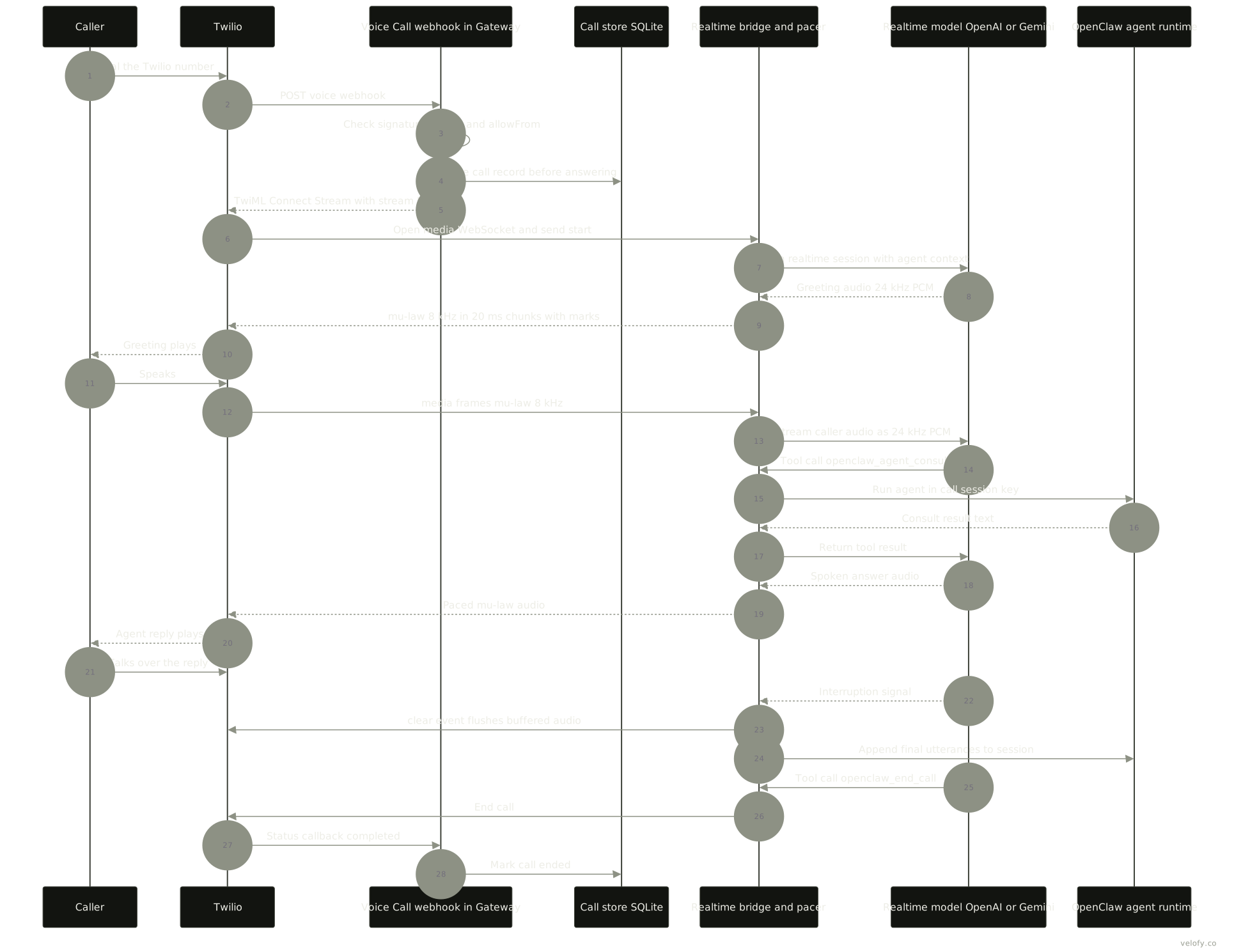
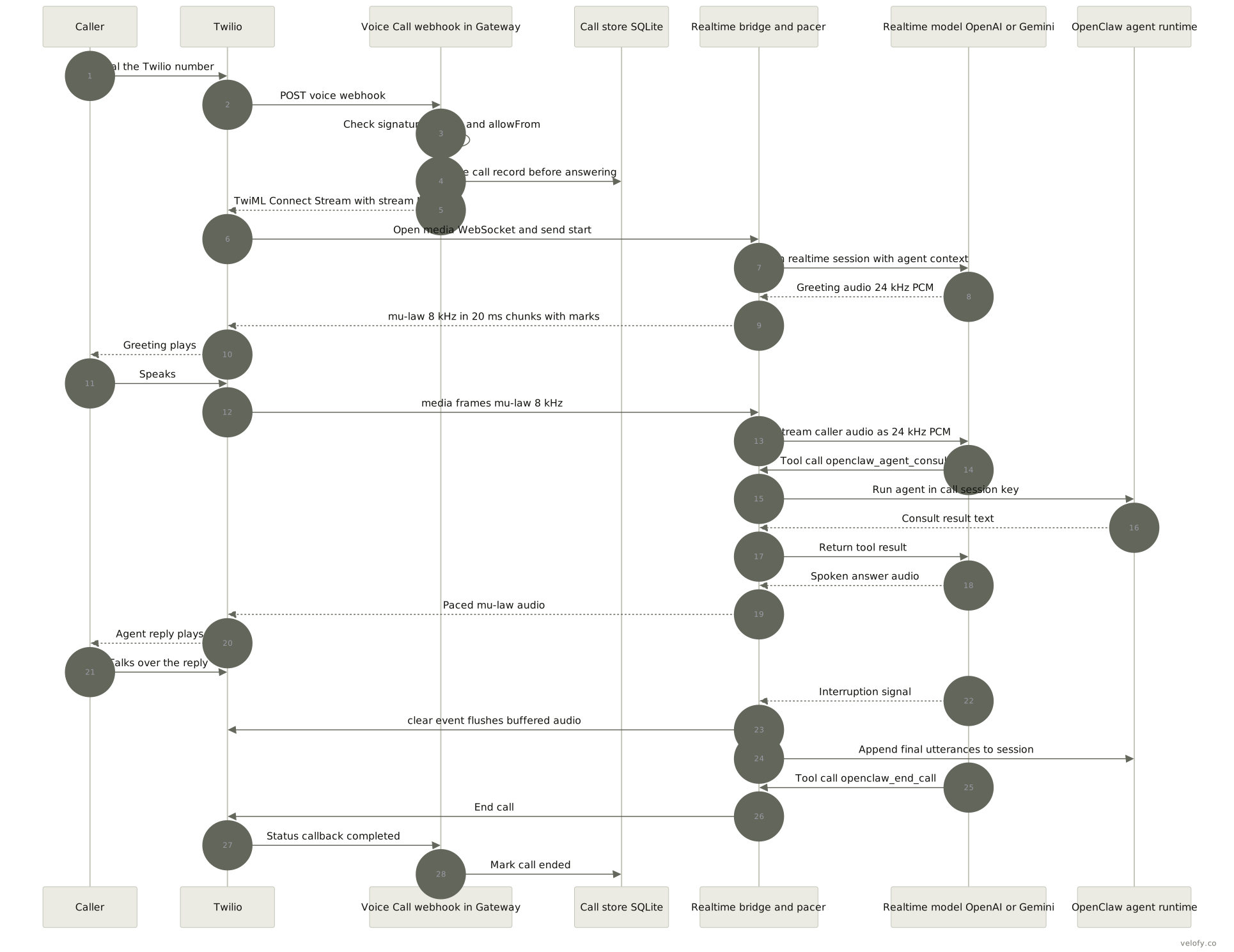
Assumptions: an inbound Twilio call, realtime mode with OpenAI, inboundPolicy: allowlist. The diagram above shows the same flow.
- The caller dials the Twilio number. Twilio POSTs to the public Voice webhook,
https://<host>/voice/webhook. - Before reading the body, the Gateway’s voice-call webhook server checks that the signature headers exist and applies the size and in-flight limits. It then verifies the Twilio signature against
publicUrland runs the replay check. - The plugin compares the normalized
FromwithallowFrom. It resolves the per-number route fromToand the owning agent. It reserves capacity, saves the call record to SQLite, and only then continues. - The plugin answers with TwiML
<Connect><Stream>, carrying a stream token, so Twilio opens a media WebSocket to the plugin. The WebSocket must sendstartwithin 5 s. - The plugin opens a realtime session with OpenAI. Agent context is added once, at session creation, so there is no extra latency per turn.
- The realtime model plays one opening greeting through the stream’s own first turn.
- Caller audio arrives as base64 mu-law 8 kHz
mediaframes. It is converted to 24 kHz PCM and streamed to the provider. - The provider handles turn detection (VAD with silence 500 ms and prefix 300 ms by default) and streams back 24 kHz PCM. That audio is converted to mu-law, paced in 20 ms chunks with a 160 ms lead, and tracked with Twilio
markevents. - If the caller asks something that needs tools or memory, the model calls
openclaw_agent_consult.- The consult runs the full OpenClaw agent in the call’s session (
agent:<id>:voice:<phone>by default), undertoolPolicy. - With
realtime.fastContext.enabled, indexed memory snippets are tried first, within a timeout. - The consult result goes back to the model, which speaks it.
- The consult runs the full OpenClaw agent in the call’s session (
- If the caller talks over the agent, the provider signals an interruption. The pacer flushes its queues and sends a Twilio
clear, so buffered phone audio stops. - Finished user and assistant utterances are appended to the agent session.
- The call ends in one of four ways: the model calls
openclaw_end_call, the caller hangs up (streamstopor a status callback), the 30 s no-media backstop fires, ormaxDurationSecondsis reached. Bridge resources close immediately. Call finalization waits 2 s in case the stream reconnects.
Configuration keys and permissions
| Key or permission | Where | Default or requirement | Notes |
|---|---|---|---|
plugins.entries.voice-call.config.provider |
Voice Call | none | twilio, telnyx, plivo, mock |
fromNumber, twilio.accountSid/authToken, telnyx.apiKey/connectionId/publicKey, plivo.authId/authToken |
Voice Call | required | Env vars also work, for example TWILIO_AUTH_TOKEN |
publicUrl / tunnel / tailscale, serve.port, serve.path |
Voice Call | 3334, /voice/webhook |
Must be public |
realtime.enabled / streaming.enabled |
Voice Call | off / see docs | Mutually exclusive |
realtime.provider, realtime.providers.<id> |
Voice Call | first registered | openai or google |
realtime.toolPolicy, realtime.consultPolicy |
Voice Call | see docs | safe-read-only/owner/none; auto/substantive/always |
inboundPolicy, allowFrom |
Voice Call | disabled, [] |
Caller-ID screen only |
sessionScope, agentId, numbers |
Voice Call | per-phone |
Session mapping and routing |
maxDurationSeconds, maxConcurrentCalls |
Voice Call | 300, 1 | Hard caps |
talk.provider, talk.silenceTimeoutMs, talk.interruptOnSpeech |
Talk | 700/900 ms, true | Native loop |
talk.realtime.mode/transport/brain |
Talk | none | Relay needs realtime/gateway-relay/agent-consult |
tools.media.models, tools.media.audio.enabled |
Voice notes | auto-detect | STT order and fallback |
tts.provider, tts.providers.<id>, tts.auto |
Replies | none | Also used for call TTS |
channels.imessage.cliPath, dbPath, remoteHost, includeAttachments |
iMessage | attachments off | SSH wrapper for a remote Mac |
plugins.entries.facetime.config.ownerHandles, realtime.* |
FaceTime | empty, owner |
Plugin will not start if ownerHandles is empty |
| Microphone, Speech Recognition | macOS Talk, wake word, push to talk | required | macOS 26+ for wake and relay |
| Accessibility or Input Monitoring | macOS push to talk | required | For the Right Option hotkey |
| Full Disk Access, Automation (Messages) | iMessage | required | Granted to the process context that runs imsg |
SIP off plus DisableLibraryValidation |
iMessage private API | optional | Needed for tapbacks, edit and similar actions |
| SIP debugging off, DevToolsSecurity on, Screen and System Audio Recording, admin for driver, full Xcode | FaceTime | required | Plus Focus allowing calls |
Accounts and costs:
- You need a carrier account (Twilio, Telnyx or Plivo) with a number.
- You need realtime or STT/TTS provider keys. The docs say a text-agent subscription “may not provide voice access”.
- Public GPT-Live needs a Platform key and bills the Platform account. Platform credentials take precedence over ChatGPT subscription access.
- The docs give no per-minute prices.
Limits and risks
- FaceTime security. It requires SIP debugging protections reduced and debugger attachment to Apple apps. Any listed handle has full owner authority. Caller authentication is only the FaceTime handle.
- FaceTime fragility. It depends on private APIs, an injected dylib and a locally built HAL driver. It is experimental, and live proof for video and Phone-hosted FaceTime Audio is still pending.
- One at a time. Voice Call defaults to one concurrent call. FaceTime supports exactly one call.
- Caller ID is weak. Voice Call
allowFromis caller-ID filtering, not identity. - GPT-Live limits. On phone calls there is no
openclaw_end_calland no custom tools, andconsultPolicy: alwaysis rejected. On browser Talk, an unexpected connection loss ends the call without reconnecting. - Mode limits. Realtime and streaming are mutually exclusive. Streaming is Twilio only. Realtime is Twilio and Telnyx only.
- Apple Speech. It may use the network for Talk and push to talk. Wake word is local only.
- iMessage private API. It needs SIP fully off, which on Apple Silicon also disables running iOS apps on the Mac.
- Tool latency. Requests that use tools are slower than plain voice replies (FaceTime docs).
What we could not verify
- Whether the iMessage inbound path converts CAF voice memos before STT, or sends CAF to providers directly. No source evidence either way was found.
- End-to-end latency figures. The docs give timers and buffers but no measured mouth-to-ear numbers.
- Whether FaceTime video calls carry any agent video. The source only tracks video flags. No docs describe it.
- Whether the FaceTime approach survives future macOS releases. Nothing in the docs commits to this.
- The exact release where Talk mode first appeared. Talk predates the CHANGELOG files we fetched.
- Carrier and provider prices. The docs give none.
- The publish date of v2026.1.12 (not fetched).
- Whether
imsg --audioproduces a true “audio message” bubble on the recipient’s device, as opposed to a CAF attachment. This is inferred from the source comment only.
Sources
All read on 2026-10-01. Docs URLs were checked live (HTTP 200) and their content read from the repo docs folder at commit a1273632, which matches the site. FaceTime and Voice Call pages were spot-checked against the live .md.
- https://docs.openclaw.ai/llms.txt
- https://docs.openclaw.ai/plugins/facetime
- https://docs.openclaw.ai/plugins/facetime-recovery
- https://docs.openclaw.ai/plugins/reference/facetime
- https://docs.openclaw.ai/plugins/voice-call
- https://docs.openclaw.ai/plugins/voice-call/configuration
- https://docs.openclaw.ai/plugins/voice-call/realtime-and-streaming
- https://docs.openclaw.ai/plugins/voice-call/tts-and-inbound-calls
- https://docs.openclaw.ai/plugins/voice-call/security-and-interfaces
- https://docs.openclaw.ai/plugins/voice-call/troubleshooting
- https://docs.openclaw.ai/nodes/talk
- https://docs.openclaw.ai/nodes/talk/macos-relay
- https://docs.openclaw.ai/nodes/talk/realtime-sessions
- https://docs.openclaw.ai/nodes/talk/session-ownership
- https://docs.openclaw.ai/nodes/voicewake
- https://docs.openclaw.ai/platforms/mac/voicewake
- https://docs.openclaw.ai/platforms/mac/voice-overlay
- https://docs.openclaw.ai/nodes/audio
- https://docs.openclaw.ai/channels/imessage
- https://docs.openclaw.ai/channels/imessage/setup
- https://docs.openclaw.ai/channels/imessage/private-api
- https://docs.openclaw.ai/channels/imessage/media
- https://docs.openclaw.ai/channels/imessage/rich-messages
- https://docs.openclaw.ai/tools/tts/output
- https://docs.openclaw.ai/tools/tts/configuration
- https://docs.openclaw.ai/tools/media-overview
- https://docs.openclaw.ai/providers/openai/voice-and-speech
- https://docs.openclaw.ai/reference/session-management-compaction/store
- https://docs.openclaw.ai/releases
- https://docs.openclaw.ai/releases/2026.9.5
- https://docs.openclaw.ai/releases/2026.9.6
- https://docs.openclaw.ai/releases/2026.9.7
- https://github.com/openclaw/openclaw (commit a1273632):
CHANGELOG/2026.1.11.md,2026.1.12.md,2026.7.1.md,2026.9.4.mdto2026.9.7.md;extensions/facetime/(README.md, docs/phase1-verification.md, openclaw.plugin.json, helper-endpoint.json, src/audio-pump.ts, src/helper-supervisor.ts, src/talk-driver.ts, scripts/inject-helper.sh);extensions/voice-call/(src/telephony-audio.ts, src/webhook/realtime-audio-pacer.ts, src/media-stream.ts, src/providers/telnyx.ts, src/providers/twilio.ts, src/config.ts, src/store-path.ts, src/manager/store.ts);extensions/imessage/src/shared.ts,src/actions.runtime.ts;src/media/audio-transcode.ts;src/channels/plugins/types.core.ts - https://api.github.com/repos/openclaw/openclaw/releases (release dates)
- https://github.com/openclaw/openclaw/pull/119291 (FaceTime pull request, merged 2026-09-20)
- https://github.com/openclaw/openclaw-facetime (README, releases v0.1.0 to v0.1.3)
- https://github.com/openclaw/homebrew-tap/tree/main/Formula (
openclaw-facetime.rbpresent) - https://registry.npmjs.org/@openclaw/facetime (dist-tags latest 2026.9.7)
Part 2: hosting
Research date: 2026-10-01. Subject: OpenClaw 2026.9.7 (released 2026-09-30 per the GitHub releases API). Docs pages were read as Markdown from docs.openclaw.ai on 2026-10-01. Page paths in square brackets, such as [install/fly], mean https://docs.openclaw.ai/install/fly. Full URLs are in Sources.
Summary
- The Gateway is one Node process (Node 24.16+ or 26.1+) that keeps all state in
~/.openclaw, mostly SQLite, and listens on port 18789, loopback by default [install/node] [gateway] [help/faq/where-things-live-on-disk]. - Minimum host is 1 virtual central processing unit (vCPU), 1 GB of random-access memory (RAM) and about 500 MB of disk; the docs recommend 2 GB or more, and several cloud guides say 1 GB can run out of memory [help/faq-first-run/providers-and-hosting] [install/fly].
- There are guides for DigitalOcean, Hetzner, Google Cloud Platform (GCP), Azure, Oracle, Fly.io, Render, Railway, Northflank, Hostinger, exe.dev, Daytona, Upstash, Cloudflare Containers, Raspberry Pi, Kubernetes, Ansible, Docker, Podman, Nix and macOS virtual machines (VMs); Amazon Web Services (AWS) has only a one-line mention [vps].
- The security model is one trust boundary per Gateway. One shared Gateway for mutually untrusted users is explicitly “Not supported” [gateway/security/trust-model].
- For many customers the docs offer
openclaw fleet: one full Gateway container (“cell”) per tenant on one host. It is experimental and single-host only, with no shared channel accounts, router, portal or billing [gateway/multi-tenant-hosting]. - iMessage needs a Mac signed in to Messages running
imsg. The Gateway can be on Linux and reachimsgover an SSH wrapper, with attachments over SCP [channels/imessage/setup] [channels/imessage/deployment]. - That SSH topology has a documented failure: sends can fail with AppleEvents error -1743 while reads work. The docs say to test a real send through the wrapper before enabling it [channels/imessage/setup].
- FaceTime is experimental. It needs the Gateway itself on the same Apple Silicon Mac, reduced SIP protections, and handles one call at a time [plugins/facetime].
- Phone voice (the voice-call plugin with Twilio, Telnyx or Plivo) runs inside the Gateway, needs no Mac, but needs a public HTTPS webhook URL [plugins/voice-call].
- OAuth tokens are stored as plaintext in SQLite. Backups must use
openclaw backup, never raw file copies. Open issues on 2026.9.6 report memory growth and CPU spikes on busy hosts [install/docker/networking-and-storage] [install/backups] [GitHub #159783, #157605].
What the Gateway needs
- Runtime. Node 24.16+ or 26.1+, with an SQLite build that is safe across write-ahead log (WAL) resets. Node 26 is recommended because it “starts the Gateway noticeably faster and uses less memory than Node 24”. Node 22, 23 and 25 are unsupported [install/node]. Bun is opt-in only [install/bun]. Linux ARMv7 is unsupported, and Alpine/musl may link a vulnerable SQLite [install/installer].
- Operating systems. macOS, Linux and Windows. On Windows, Windows Subsystem for Linux 2 (WSL2) is “the most Linux-compatible Gateway runtime”. Ubuntu Long Term Support (LTS) is “the best-tested Linux install path” [install] [platforms/windows] [help/faq-first-run/providers-and-hosting].
- Machine size. Absolute minimum 1 vCPU, 1 GB RAM, about 500 MB disk. Recommended 1 to 2 vCPU and 2 GB or more, because “Node tools and browser automation can be resource hungry” [help/faq-first-run/providers-and-hosting]. Building the Docker image from source needs 6 GB RAM; small hosts should pull the prebuilt image [install/docker].
- Port. One port, 18789, carries WebSocket RPC, the HTTP APIs, the Control UI and hooks [gateway]. Non-loopback binds refuse to start without token, password or trusted-proxy auth [gateway/remote].
- State. Everything under
$OPENCLAW_STATE_DIR(default~/.openclaw):openclaw.json,state/openclaw.sqlite, one SQLite database per agent,credentials/, and the workspace at~/.openclaw/workspace[help/faq/where-things-live-on-disk]. “Only one gateway process should own a state directory” [gateway/gateway-lock]. - Resource numbers. The docs give no idle or load figures for RAM or CPU. Worker threads request a 512 MiB V8 heap limit [gateway/diagnostics]. Update snapshots need disk space of “2 × total SQLite family bytes + 3 × largest family + 64 MiB” [cli/update/how-updates-run]. Field reports are in Operations below.
Hosting options
| Option | Fits | Watch out |
|---|---|---|
| Installer script on any Linux virtual private server (VPS), as a systemd user unit | The default. “The CLI remains the simplest option for a headless server or VPS” [platforms/linux]. | Needs loginctl enable-linger so the service survives logout [gateway]. |
| DigitalOcean [install/digitalocean] | 1 vCPU, 1 GB, 25 GB solid-state drive (SSD), about $6 a month, plus 2 GB swap. | Move to 2 GB if out-of-memory persists. “Avoid third-party Marketplace 1-click images.” |
| Hetzner [install/hetzner] | Docker on Debian or Ubuntu, firewall open on TCP 22 only. | “Do not add a public inbound rule for TCP 18789.” No price quoted. |
| GCP [install/gcp] | e2-standard-2 (8 GB) for source builds; e2-small or e2-medium with the prebuilt image. | Keep 18789 closed. Avoid the Owner role. |
| Azure [install/azure] | Standard_B2as_v2 with no public IP; SSH through Bastion. VM about $55 a month. | Bastion Standard costs about $140 a month. No persistence or update section. |
| Oracle Cloud [install/oracle] | Always Free Arm (guide uses 2 OCPU, 12 GB) behind Tailscale. | “Out of capacity” errors, and some skill binaries lack Arm builds. |
| Fly.io [install/fly] | shared-cpu-2x, 2 GB, a 1 GB volume at /data, about $10 to $15 a month. |
“512MB is too small.” The default app is public; use fly.private.toml. Without OPENCLAW_STATE_DIR=/data, state is lost on restart. |
| Render [install/render] | Starter plan, 1 GB disk at /data that survives redeploys. |
Free tier sleeps and has no disk, so “state resets on every deploy.” |
| Railway, Northflank [install/railway] [install/northflank] | One-click templates with a /data volume. |
Served publicly at /openclaw. No sizes or prices given. |
| Hostinger [install/hostinger] | 1-Click managed with automatic updates, or a Docker VPS. | No sizes, ports or costs given. |
| exe.dev [install/exe-dev] | Cheap always-on VM; nginx forwards to loopback with HTTPS and email auth. | “Keep this VM stateful.” |
| Daytona, Upstash Box [install/daytona] [install/upstash] | Sandboxed dev boxes. | No service manager; the process does not survive a Daytona sandbox restart. |
| Cloudflare Containers [install/cloudflare] | Experimental; 6 GiB instance, about $40 to $50 a month. | Litestream restores only SQLite, not openclaw.json, credentials, plugins or workspaces. “A small always-on virtual machine is often cheaper.” |
| Docker or Podman [install/docker] [install/podman] | Official image ghcr.io/openclaw/openclaw; bind-mount state; entrypoint runs doctor --fix. |
Container defaults to a lan bind, so pair it with auth. Do not bind-mount openclaw.json as a single file. |
| Kubernetes [install/kubernetes] | Kustomize starter: one pod, a 10Gi persistent volume claim (PVC). | “Not a production-ready deployment.” Deleting the namespace deletes the PVC. |
| Raspberry Pi [install/raspberry-pi] | Pi 4 (4 GB) or Pi 5, 64-bit operating system, SSD preferred. | SD cards wear out. “Do not run local LLMs on a Pi.” |
| macOS VM (Lume, MacStadium) [install/macos-vm] | Only when you need macOS features such as iMessage. | About 60 GB per VM; “For true always-on, consider a dedicated Mac mini or a small VPS.” |
| AWS [vps] | “AWS (EC2 / Lightsail / free tier) also works well.” | No guide; the page links only a community video. |
The docs name no single best provider. They say “Want 24/7 reliability? Use a VPS”, and that a Mac mini “is a popular always-on host choice” but not required [help/faq-first-run/providers-and-hosting]. There is no dedicated Mac mini or home-server guide [vps].
The Mac side
Anything that goes through Apple’s own apps needs a signed-in Mac. That covers iMessage, FaceTime and the macOS node features below. Phone voice does not need a Mac. The last part of this section covers renting Macs instead of owning them.
iMessage
- BlueBubbles support was removed. “OpenClaw supports iMessage through
imsgonly” [channels/imessage] [announcements/bluebubbles-imessage]. The Gateway spawnsimsg rpcand talks JSON-RPC over stdio, with “no separate daemon or port” [channels/imessage]. - Needs a real macOS session. Messages must be signed in on the Mac running
imsg. Full Disk Access is needed to read~/Library/Messages/chat.db, and Automation permission is needed to send through Messages.app [channels/imessage/setup]. Permissions are granted per process context; a headless (LaunchAgent or SSH) setup must run a one-time interactive command in that same context to trigger the prompts [channels/imessage/setup]. - Private API mode. Reactions, edits, unsend, threaded replies, effects, polls, typing indicators and read receipts need
imsg launch, which injects a helper into Messages.app and “refuses to inject when SIP is enabled.” On macOS 11 and later you also need to disable library validation [channels/imessage/private-api]. The docs call this “strongly encouraged for a complete iMessage channel” [channels/imessage], and also warn “Disabling SIP is a real security tradeoff” and recommend “a dedicated Mac or bot macOS user” [channels/imessage/private-api]. Basic text and media work without it [channels/imessage/setup]. The helper can drop out after a Messages restart or OS update and must be relaunched [channels/imessage/private-api]. - Linux Gateway, Mac helper over SSH: supported. “Linux and Windows gateways can still use iMessage by pointing
channels.imessage.cliPathat an SSH wrapper that runsimsgon the signed-in Mac” [announcements/bluebubbles-imessage]. The wrapper isexec ssh -T <mac> imsg "$@";remoteHostenables inbound attachment fetches and outbound staging over SSH and SCP;dbPathis the path on the Mac [channels/imessage/deployment]. Host keys must already be trusted and SSH must use keys. The wrapper must be a transparent stdio pipe for long-lived JSON-RPC [channels/imessage/setup]. - The main risk of that topology. Over SSH, reads and inbound can work while sends fail with “Not authorized to send Apple events to Messages. (-1743)”, because macOS records the Automation grant against
/usr/libexec/sshd-keygen-wrapper, which has no usable toggle. The docs’ remedies: run the Gateway, or at least theimsgbridge, in the logged-in Messages user’s session; or “verify that a real outboundimsg sendsucceeds through the exact wrapper before enabling the channel” [channels/imessage/setup]. An open issue also reports final replies stranded when the SSH transport stalls mid-send [GitHub #115328]. - Several accounts. Per-account config lives under
channels.imessage.accounts.<id>, each with its owncliPathanddbPath. The documented pattern is “a dedicated Apple ID and macOS user so bot traffic is isolated” [channels/imessage/deployment]. The docs state no maximum number of accounts per Mac or per Gateway, and no iMessage rate limits or Apple ban warnings.
FaceTime
- Experimental and disabled by default. It auto-answers calls from configured owner handles and can place calls with approval; a realtime voice provider handles speech [plugins/facetime].
- Cannot be remote. “Run the Gateway and native helper on the same Mac, in the same signed-in user session” [plugins/facetime].
- Requirements: Apple Silicon, macOS 14.4 or later, FaceTime signed in, full Xcode, an administrator account, the signed companion from Homebrew, Developer Tools security enabled, and
csrutil enable --without debug(“Do not disable all of SIP”). It installs a BlackHole-based audio driver [plugins/facetime] [plugins/facetime-recovery]. - Warning: it “uses private Apple APIs and injects a helper into Apple call applications … Use a dedicated, up-to-date Mac that you physically control.” Limits: “One managed call at a time”, one-to-one only, FaceTime calls only (no cellular or PSTN) [plugins/facetime]. An open issue reports finished calls stuck in
closingand blocking the next call until the Gateway restarts [GitHub #154228].
Phone voice without a Mac
The voice-call plugin “runs inside the Gateway process”, supports Twilio, Telnyx and Plivo, and must resolve to a public webhook URL; loopback or private addresses fail setup [plugins/voice-call]. The local listener defaults to port 3334 at /voice/webhook; exposure is by publicUrl, ngrok, or Tailscale Funnel; maxConcurrentCalls defaults to 1 and inboundPolicy to disabled [plugins/voice-call/configuration]. The docs call caller-ID allowlisting “a low-assurance caller-ID screen” [plugins/voice-call/tts-and-inbound-calls].
macOS node features
The Mac app needs macOS 15 or later; Voice Wake and push-to-talk need macOS 26 [platforms/macos]. A Mac node adds camera and screen capture, notifications, location, computer control and a Peekaboo UI bridge [platforms/macos]. The realtime Talk relay needs macOS 26 [nodes/talk/macos-relay]. A remote Mac “needs the same TCC approvals as local” (TCC is Apple’s Transparency, Consent and Control permission system) [platforms/mac/remote], and “OpenClaw does not unlock the Mac” after a lock or logout [platforms/mac/permissions].
Hosted Macs
- The macOS VM page says hosted Macs “work too”, names only MacStadium, and adds “Other hosted Mac vendors also work; follow their VM + SSH docs” [install/macos-vm]. The local option is Lume on an Apple Silicon Mac running Sequoia or later; in Setup Assistant you can “sign in if you want iMessage later”, and headless use needs auto-login [install/macos-vm].
- The docs do not mention Amazon Elastic Compute Cloud (EC2) Mac, Scaleway, Tart or UTM, Apple ID sign-in limits inside VMs, or how SIP changes work on hosted machines beyond “Virtual-machine setups follow a separate flow, so take a VM snapshot first” [channels/imessage/private-api].
- Independent sources (vendor material, treat with care): Hyperbox lists AWS EC2 Mac at about $0.65 an hour for M1 (about $475 a month) up to $1.97 an hour for M4 Pro, with a 24-hour minimum allocation [hyperbox.sh]. OpenclawVPS, which sells Mac hosting from $99 a month, reports that Full Disk Access stops working after reboots on headless Mac minis until the grants are removed and re-added [openclawvps.io]. Alibaba Cloud documents a Linux Gateway reaching a Mac over Tailscale with an
imsg-sshwrapper [alibabacloud.com]. Gizmodo recommends a VPS for most users and a Mac mini when iMessage is needed [gizmodo.com].
Networking and access
- Bind.
gateway.bindisloopback(default),lan(0.0.0.0),tailnet,customorauto[gateway/config-gateway]. “Never expose the Gateway unauthenticated on0.0.0.0” [gateway/security/network-exposure]. Public remote hosts must usewss://[gateway/remote]. - Preferred order in the exposure runbook: loopback plus SSH; loopback plus Tailscale Serve; tailnet or LAN bind with auth and a firewall; trusted proxy; public internet (“Rare, high-risk”) [gateway/security/exposure-runbook].
- SSH tunnels.
ssh -N -L 18789:127.0.0.1:18789 user@host. “SSH tunnels do not bypass gateway auth” [gateway]. But a tunnelled client counts as local, so pairing is auto-approved unlessautoApproveLocal: false[gateway/pairing]. - Tailscale. Serve keeps the Gateway on 127.0.0.1 and can accept the verified Tailscale identity for the Control UI only; Funnel is public and “refuses to start unless auth mode is
password” [gateway/tailscale]. - Cloudflare Access and other identity-aware proxies. Tunnel to
127.0.0.1:18789withauth.mode: "trusted-proxy"[gateway/cloudflare-access]. Warnings: “The Gateway does not re-authenticate the person or verify the Access JWT signature”, and any wider bind “bypasses Access entirely” [gateway/cloudflare-access]. Pomerium, Caddy, oauth2-proxy and Traefik also work; the security audit always flags trusted-proxy as critical [gateway/trusted-proxy-auth]. - Nodes. Phones, Macs and headless machines connect with
role: "node"over the same WebSocket. “Nodes are peripherals, not gateways” [nodes]. Pairing has two steps, device approval then node capability approval [gateway/pairing] [nodes/pairing-and-status]. iOS and Android needwss://or Tailscale for the first remote connection [gateway/discovery]. The Mac app in remote mode tunnels over SSH [nodes]. Tailscale identity headers do not authenticate nodes; behind trusted-proxy, nodes need a token or a Cloudflare service token [nodes/node-host] [gateway/cloudflare-access]. - Cloud workers and Crabbox. Cloud workers move a session’s coding work to “a throwaway cloud machine” leased through the bundled Crabbox plugin (AWS, Azure, Daytona, Google Cloud, Hetzner and others). The worker dials the Gateway’s public Transport Layer Security (TLS) endpoint, so loopback-only Gateways cannot dispatch. Model and cloud credentials stay off the box [gateway/cloud-workers] [gateway/cloud-workers/security-model]. The Crabbox sandbox backend runs only tool calls remotely and starts with Daytona leases [gateway/sandboxing/crabbox-backend]. These are for agent sandboxes, not for hosting tenants or Macs.
Running it for a team or many users
What the docs support
- A trusted team on one Gateway: “Supported: one trust boundary per gateway - a single operator or a mutually trusting team” [gateway/security/trust-model]. The team-server guide combines a Linux host, Cloudflare Tunnel and Access, per-person sign-in, GitHub identity and roles; OpenClaw runs its own team.openclaw.ai this way [gateway/team-server].
- Several Gateways on one host with
--profile, each with its own state, config, workspace and port [gateway/multiple-gateways]. - Many tenants as Fleet cells: “Hosting users or organizations that do not share a trust boundary therefore means running a separate complete OpenClaw instance for each tenant.” Each cell is a full Gateway in a hardened container with its own state, credentials, channel accounts, token, and a loopback-only host port. Defaults per cell: 2 GB memory, 2 CPUs, 512 processes [gateway/multi-tenant-hosting] [cli/fleet].
What the docs refuse or leave out
- “Not supported: one shared gateway/agent used by mutually untrusted or adversarial users” [gateway/security/trust-model]. “Session IDs select routing; they do not authorize one tenant against another” [gateway/multi-tenant-hosting]. Roles “do not isolate hostile users from each other” [gateway/team-server].
- Fleet is “experimental” and may change “without a deprecation window.” It does not provide “Shared channel accounts or a shared ingress router”, “Remote cell hosts managed by one supervisor”, or “A tenant self-service portal, billing plane, or delegated administration UI.” “Fleet is a single-host lifecycle supervisor; multi-machine, identity-governed fleets require a separate control-plane layer” [gateway/multi-tenant-hosting].
- “The Fleet operator and the host are trusted by every tenant. Resistance to a compromised host is a non-goal.” Outbound egress is unrestricted by default [gateway/multi-tenant-hosting].
- A hosted multi-user “Bot mode” exists only as a draft product spec dated 2026-09-09 that “does not claim implementation” [GitHub #142972].
Operations checklist
- Supervision. Linux:
openclaw gateway installwrites a systemd user unit withRestart=always,OOMPolicy=continue,KillMode=mixedand a 330-second stop timeout; enable linger [platforms/linux] [gateway/doctor/gateway-and-services]. macOS: LaunchAgentai.openclaw.gateway; launchd can stop honouringKeepAliveafter a crash burst, so add a watchdog that runslaunchctl kickstart[gateway/troubleshooting/gateway-service-and-process]. Docker: the image health check pings/healthz; exit code 78 means runopenclaw doctor --fix[install/docker]. - Health.
/healthzfor liveness,/startupzfor startup,/readyzfor real readiness including agent databases and channel accounts. “Supervisors that need to detect a Gateway that is running but cannot admit work must monitor/readyz” [gateway/health]. Prometheus metrics need thediagnostics-prometheusplugin at an authenticated/api/diagnostics/prometheus[gateway/prometheus]. - Backups. “Never copy live
.sqlite,-wal,-shm, or-journalfiles as a backup.” Useopenclaw backup create --verify(SQLite online backup API, includes workspaces) or scheduleopenclaw backup enable --to offsite --every 24h --keep-daily 7; without keep flags nothing is pruned. Restore goes to an empty directory, never in place [install/backups]. Back up before each upgrade. - Secrets. “Current OAuth token material is stored as plaintext in SQLite … including access, refresh, and ID-token values” [install/docker/networking-and-storage]. Treat state backups as credentials. Use SecretRefs (
env,file,execfor 1Password or Vault) andopenclaw secrets audit --check; “Plaintext still works. SecretRefs are opt-in” [gateway/secrets] [cli/secrets]. Keep~/.openclawat 700 and files at 600, with disk encryption and a dedicated OS user [gateway/security/secrets-and-storage]. - Logs. JSON Lines (JSONL) at
/tmp/openclaw/openclaw-YYYY-MM-DD.log, rotated at 100 MB with five archives; on macOS also~/Library/Logs/openclaw/gateway.log. Redaction is always on but “best-effort” [gateway/logging] [logging]. Ship logs off the host, since/tmpis not durable. - Upgrades. Automatic updates are off by default [install/updating/automatic-updates].
openclaw updatevalidates a candidate, runs Doctor migrations and checks/readyz; “Downgrading the package does not reverse config or database migrations” [install/updating] [install/updating/rollback-and-recovery]. “openclaw doctor --fixis the single owner of file-to-SQLite migrations” [start/why-openclaw/versioned-state-guarded-upgrades]. Installs older than June 2026 must go through 2026.9.5 first [install/updating]. Fleet cells upgrade withopenclaw fleet upgrade <tenant>[gateway/multi-tenant-hosting]. - Memory headroom. Field reports on 2026.9.6: Gateway heap growing about 45 to 100 MiB an hour at rest until a V8 out-of-memory crash, resident set size (RSS) 5 to 6 GiB on a 23-agent host [GitHub #159783]; CPU at 240 to 276 percent and 6.7 to 8.5 GB RAM on a 16 vCPU host [GitHub #157605]; a catalog worker reaching 1.15 GB despite a 512 MB limit [GitHub #160522]; a 632-agent fleet where
/healthstopped answering and RSS passed 3 GB [GitHub #149538]; and one out-of-memory session that restart recovery replayed into seven crashes [GitHub #115424]. The 2026.9.7 notes claim it is “snappier under load” and bound memory for large usage totals, without numbers [CHANGELOG 2026.9.7]. Size cells above the 2 GB Fleet default for busy tenants and alert on RSS. - Mac hosts. Disable sleep, enable auto-login for the bot user, keep the
imsg launchhelper alive after OS updates, and re-check Full Disk Access and Automation after reboots [install/macos-vm] [channels/imessage/private-api] [openclawvps.io]. - Labour. One independent write-up logged about 6.5 hours a month of maintenance for one self-hosted instance, including out-of-memory incidents and silent WebSocket drops, on 4 vCPU and 8 GB servers costing $5 to $56 a month [dev.to].
A recommended topology for an iMessage-plus-voice product


This section is our recommendation, not something the docs prescribe. The diagram above shows the layout.
- Linux Gateway hosts, one Fleet cell per customer. Each customer gets a full Gateway container from
openclaw fleeton a Linux VM, published only on host loopback. Size cells at 4 GB or more rather than the 2 GB default. Run several hosts and keep a simple placement table (customer to host) yourself, because Fleet cannot manage remote hosts. Rests on: one trust boundary per Gateway and “Not supported” for shared Gateways [gateway/security/trust-model]; Fleet cell design and scope limits [gateway/multi-tenant-hosting] [cli/fleet]; Linux is the best-tested and recommended always-on host [help/faq-first-run/providers-and-hosting]; memory reports [GitHub #159783, #157605]. - A Mac fleet that only runs
imsg. Apple Silicon Mac minis you control, one macOS user plus one dedicated Apple ID per customer number, Messages signed in,imsginstalled in that user. Each cell’s iMessage config pointscliPathat an SSH wrapper andremoteHostat<customer-user>@<mac>over a private tailnet. No Gateway runs on these Macs. Rests on: SSH wrapper support [announcements/bluebubbles-imessage] [channels/imessage/deployment]; the dedicated Apple ID and macOS user pattern [channels/imessage/deployment]; private API needing SIP off, which is a reason to use dedicated machines [channels/imessage/private-api]. - Prove sends before launch on every Mac user. Because of the -1743 Automation failure, run a real
imsg sendthrough the exact wrapper from the cell for each customer before enabling the channel. If it cannot be granted, fall back to a Gateway on that Mac for that customer. Rests on: [channels/imessage/setup]. - Phone voice on the Linux cells. Enable the voice-call plugin inside each customer’s cell with Twilio or Telnyx, and publish one public HTTPS route per cell for
/voice/webhookthrough a reverse proxy in front of the cell’s loopback port. Rests on: voice-call runs in the Gateway and needs a public webhook [plugins/voice-call]; Fleet allows “an approved reverse proxy, SSH tunnel, or tailnet in front of that loopback endpoint” [gateway/multi-tenant-hosting]. - FaceTime only as a separate, small offering. FaceTime needs the Gateway on the same Mac and handles one call at a time, so it does not fit the Linux cell design. If offered, it is one Mac per customer running that customer’s Gateway, treated as experimental. Rests on: [plugins/facetime] [GitHub #154228].
- Operator access through Cloudflare Access or Tailscale, never a public 18789; per-cell tokens kept in a secret manager; scheduled
openclaw backupto off-host storage, treated as credentials;/readyzmonitored per cell. Rests on: [gateway/cloudflare-access] [gateway/security/exposure-runbook] [install/backups] [gateway/health].
What talks to what: customers’ iPhones talk to Apple; Apple delivers to Messages.app on the Mac; the customer’s cell on Linux runs imsg on that Mac over SSH and fetches attachments by SCP; phone calls go from the carrier to the cell’s public webhook route; operators reach the hosts through Cloudflare Access or the tailnet; cells never talk to each other.
The product layer the docs say is missing (shared ingress router, multi-host placement, customer portal, billing) has to be built by the owner [gateway/multi-tenant-hosting].
What we could not verify
- Whether several macOS users on one Mac can each keep Messages signed in and
imsgworking at the same time, which decides how many customers fit per Mac. The docs show one bot user per Apple ID but give no per-Mac limit. - Whether
imsgover SSH can work reliably for sends under private API mode, or whether the -1743 Automation problem applies there too. The private API page does not say. - Whether the official container image used by Fleet cells ships an SSH client and can hold the wrapper script and keys; the Fleet docs do not mention SSH.
- Apple’s limits: Apple ID sign-in inside macOS VMs and on EC2 Mac or Scaleway, iMessage sending rate limits, and account suspension risk for bot traffic. The docs are silent; only vendor blog posts touch hosted Macs.
- Idle and load resource figures from the docs. All numbers above come from GitHub issues on 2026.9.6, which may be fixed in 2026.9.7.
- Costs at scale. Independent cost articles cover single instances only; we found no write-up of a many-tenant production deployment.
Sources
All read on 2026-10-01.
OpenClaw docs (https://docs.openclaw.ai/, read as .md):
- https://docs.openclaw.ai/llms.txt
- https://docs.openclaw.ai/install
- https://docs.openclaw.ai/install/installer
- https://docs.openclaw.ai/install/node
- https://docs.openclaw.ai/install/bun
- https://docs.openclaw.ai/install/nix
- https://docs.openclaw.ai/install/docker
- https://docs.openclaw.ai/install/docker/compose-operations
- https://docs.openclaw.ai/install/docker/networking-and-storage
- https://docs.openclaw.ai/install/docker/sandbox-and-troubleshooting
- https://docs.openclaw.ai/install/docker-vm-runtime
- https://docs.openclaw.ai/install/podman
- https://docs.openclaw.ai/install/kubernetes
- https://docs.openclaw.ai/install/ansible
- https://docs.openclaw.ai/install/azure
- https://docs.openclaw.ai/install/cloudflare
- https://docs.openclaw.ai/install/daytona
- https://docs.openclaw.ai/install/digitalocean
- https://docs.openclaw.ai/install/exe-dev
- https://docs.openclaw.ai/install/fly
- https://docs.openclaw.ai/install/gcp
- https://docs.openclaw.ai/install/hetzner
- https://docs.openclaw.ai/install/hostinger
- https://docs.openclaw.ai/install/northflank
- https://docs.openclaw.ai/install/oracle
- https://docs.openclaw.ai/install/railway
- https://docs.openclaw.ai/install/raspberry-pi
- https://docs.openclaw.ai/install/render
- https://docs.openclaw.ai/install/upstash
- https://docs.openclaw.ai/install/macos-vm
- https://docs.openclaw.ai/install/backups
- https://docs.openclaw.ai/install/updating
- https://docs.openclaw.ai/install/updating/automatic-updates
- https://docs.openclaw.ai/install/updating/rollback-and-recovery
- https://docs.openclaw.ai/install/updating/update-methods
- https://docs.openclaw.ai/install/update-troubleshooting
- https://docs.openclaw.ai/install/migrating
- https://docs.openclaw.ai/vps
- https://docs.openclaw.ai/platforms
- https://docs.openclaw.ai/platforms/linux
- https://docs.openclaw.ai/platforms/windows
- https://docs.openclaw.ai/platforms/easyrunner
- https://docs.openclaw.ai/platforms/macos
- https://docs.openclaw.ai/platforms/mac/bundled-gateway
- https://docs.openclaw.ai/platforms/mac/remote
- https://docs.openclaw.ai/platforms/mac/permissions
- https://docs.openclaw.ai/platforms/ios
- https://docs.openclaw.ai/gateway
- https://docs.openclaw.ai/gateway/remote
- https://docs.openclaw.ai/gateway/tailscale
- https://docs.openclaw.ai/gateway/cloudflare-access
- https://docs.openclaw.ai/gateway/trusted-proxy-auth
- https://docs.openclaw.ai/gateway/team-server
- https://github.com/openclaw/openclaw/blob/a12736320cf4e0578429895aa1ec9de35199dbf7/docs/gateway/multi-tenant-hosting.md
- https://github.com/openclaw/openclaw/blob/a12736320cf4e0578429895aa1ec9de35199dbf7/docs/cli/fleet.md
- https://docs.openclaw.ai/gateway/multiple-gateways
- https://docs.openclaw.ai/gateway/cloud-workers
- https://docs.openclaw.ai/gateway/cloud-workers/security-model
- https://docs.openclaw.ai/gateway/cloud-workers/placement-and-machine-selection
- https://docs.openclaw.ai/gateway/cloud-sessions
- https://docs.openclaw.ai/gateway/sandboxing/crabbox-backend
- https://docs.openclaw.ai/gateway/sandboxing/ssh-backend
- https://docs.openclaw.ai/plugins/reference/crabbox
- https://docs.openclaw.ai/cli/worker
- https://docs.openclaw.ai/gateway/config-gateway
- https://docs.openclaw.ai/gateway/security
- https://docs.openclaw.ai/gateway/security/trust-model
- https://docs.openclaw.ai/gateway/security/network-exposure
- https://docs.openclaw.ai/gateway/security/exposure-runbook
- https://docs.openclaw.ai/gateway/security/hardened-baseline
- https://docs.openclaw.ai/gateway/security/secrets-and-storage
- https://docs.openclaw.ai/gateway/stable-https-url
- https://docs.openclaw.ai/gateway/pairing
- https://docs.openclaw.ai/gateway/discovery
- https://docs.openclaw.ai/gateway/health
- https://docs.openclaw.ai/gateway/logging
- https://docs.openclaw.ai/gateway/prometheus
- https://docs.openclaw.ai/gateway/diagnostics
- https://docs.openclaw.ai/gateway/restart-recovery
- https://docs.openclaw.ai/gateway/gateway-lock
- https://docs.openclaw.ai/gateway/secrets
- https://docs.openclaw.ai/gateway/doctor/gateway-and-services
- https://docs.openclaw.ai/gateway/troubleshooting/gateway-service-and-process
- https://docs.openclaw.ai/logging
- https://docs.openclaw.ai/cli/backup
- https://docs.openclaw.ai/cli/doctor/sqlite-maintenance
- https://docs.openclaw.ai/cli/update
- https://docs.openclaw.ai/cli/update/how-updates-run
- https://docs.openclaw.ai/cli/health
- https://docs.openclaw.ai/cli/secrets
- https://docs.openclaw.ai/nodes
- https://docs.openclaw.ai/nodes/pairing-and-status
- https://docs.openclaw.ai/nodes/node-host
- https://docs.openclaw.ai/nodes/talk
- https://docs.openclaw.ai/nodes/talk/macos-relay
- https://docs.openclaw.ai/channels/imessage
- https://docs.openclaw.ai/channels/imessage/setup
- https://docs.openclaw.ai/channels/imessage/deployment
- https://docs.openclaw.ai/channels/imessage/private-api
- https://docs.openclaw.ai/channels/imessage/troubleshooting
- https://docs.openclaw.ai/announcements/bluebubbles-imessage
- https://docs.openclaw.ai/plugins/facetime
- https://docs.openclaw.ai/plugins/facetime-recovery
- https://docs.openclaw.ai/plugins/voice-call
- https://docs.openclaw.ai/plugins/voice-call/configuration
- https://docs.openclaw.ai/plugins/voice-call/tts-and-inbound-calls
- https://docs.openclaw.ai/plugins/voice-call/security-and-interfaces
- https://docs.openclaw.ai/help/faq-first-run/providers-and-hosting
- https://docs.openclaw.ai/help/faq/where-things-live-on-disk
- https://docs.openclaw.ai/help/faq/remote-gateways-and-nodes
- https://docs.openclaw.ai/start/teams
- https://docs.openclaw.ai/start/why-openclaw/secrets
- https://docs.openclaw.ai/start/why-openclaw/versioned-state-guarded-upgrades
- https://docs.openclaw.ai/releases/2026.8.1/security-and-privacy
GitHub (openclaw/openclaw):
- https://github.com/openclaw/openclaw/releases (v2026.9.7, 2026-09-30, via the GitHub API)
- https://raw.githubusercontent.com/openclaw/openclaw/main/CHANGELOG/2026.9.7.md
- https://github.com/openclaw/openclaw/issues/159783
- https://github.com/openclaw/openclaw/issues/157605
- https://github.com/openclaw/openclaw/issues/160522
- https://github.com/openclaw/openclaw/issues/149538
- https://github.com/openclaw/openclaw/issues/115424
- https://github.com/openclaw/openclaw/issues/115328
- https://github.com/openclaw/openclaw/issues/154228
- https://github.com/openclaw/openclaw/issues/142972
Independent:
- https://dev.to/mehul_bhardwaj_8a2d2aaecb/what-self-hosting-openclaw-actually-costs-its-not-just-the-vps-353o (Mehul Bhardwaj, 2026-04-05)
- https://openclawvps.io/blog/openclaw-imessage (vendor, 2026-05-13)
- https://www.alibabacloud.com/help/en/simple-application-server/use-cases/invoking-imessage-via-openclaw (updated 2026-06-21)
- https://gizmodo.com/best-web-hosting/openclaw/mac-mini-or-vps (Florian Gray, 2026-10-01)
- https://hyperbox.sh/blog/openclaw-macstadium-aws-alternative (vendor, 2026-05-20)