Muse Code is Meta’s coding agent for the terminal and for continuous integration (CI). It plans, edits files and runs commands in a project, using Meta’s own Muse Spark models, with approvals and an operating system (OS) sandbox switched on from the first run. It matters because it is the first coding agent from Meta Superintelligence Labs (MSL), it is priced well below its peers, and it exposes its whole engine to other programs through an open protocol, so other harnesses can drive it.
A note on the name. Meta sells two products called Muse. “Muse” on its own is a consumer personal agent launched on 8 September 2026 that runs in a Meta-hosted virtual machine (VM) and books, buys and emails on a user’s behalf. The muse command line tool on a developer’s machine is Muse Code. This paper is about Muse Code. The consumer agent is described only where it shares parts with it.
Facts at a glance
- Maker: Meta Platforms, through Meta Superintelligence Labs.
- First release: public beta on 5 August 2026, alongside Muse Spark 1.2. Left beta on 31 August 2026 (Meta’s post) or 1 September 2026 (press).
- Current version: 1.4.2 (build 1.4.2-R4684.1 on the
muse-stablechannel as of 1 October 2026). - Licence: the command line interface (CLI) is proprietary and ships as a closed binary. The TypeScript software development kit (SDK),
@muse-code/sdk, is MIT-licensed on GitHub. - Pricing: subscriptions at $5, $15 and $50 a month, or pay as you go on the Meta Model application programming interface (API), at $1.25 input and $4.25 output per million tokens on the Standard tier.
- Platforms: macOS and Linux, with Windows documented but with gaps.
- Models: Muse Spark 1.2 (documented default) and Muse Spark 1.3; the catalogue also lists Muse Glimmer, Muse Image and Muse Voice Transcribe.
- Where it runs: the agent runs locally; inference runs in Meta’s cloud. There is no local model path for the main agent.
First principles
A terminal coding agent is a loop. A model proposes a step, a harness runs it on a real machine, and the result goes back to the model. Muse Code’s design follows from where each part of that loop lives and what can go wrong in it.
- The thinking is remote, the effects are local. Inference runs in Meta’s cloud, but files change and commands run on the developer’s machine. The boundary that protects the machine therefore has to be local: the OS sandbox and the approval policy, not the model’s good behaviour.
- An agent that can write files can rewrite its own rules. If the agent could edit its settings, skills or Git history, every restriction would be one edit away from gone. That is why
.git,.museand.agentsstay read-only inside the sandbox. - Long work outlives any context window. Even a window of about one million tokens fills, and compaction is lossy. The durable record has to sit outside the model. Muse Code keeps an append-only event log, so resume, export and rewind are built from that log rather than from what the model remembers.
- Parallel agents cost more and can collide. Each subagent spends its own tokens, consistent with an independent review’s measurement of the multi-agent default at roughly 1.5 to 2 times the tokens of a single-agent CLI. Agents writing to the same files can also overwrite each other, which is what per-child Git worktrees prevent.
- Whatever runs outside the sandbox is not confined to the workspace. Model Context Protocol (MCP) tools and hooks both run outside it. Approval still applies to MCP tools, and hooks get a cleared environment, but neither is held to the sandbox’s write limits.
- Another program can drive an agent only through a stable contract. A harness needs typed messages, not screen output. The Muse Session Protocol (MSP), with its schema export, is that contract.
Product
Muse Code is a terminal program. You install it with a one-line script, run muse inside a project, trust the workspace, sign in, and describe a task. It reads the code, proposes or makes edits, runs commands, and asks before doing anything its policy treats as risky. A headless form, muse exec "<prompt>", runs one prompt for scripts and CI and can emit machine-readable JavaScript Object Notation (JSON) Lines (JSONL) events.
The day-to-day surface is a set of slash commands and built-in skills. /plan turns a task into a plan that needs approval, /grill stress-tests a plan, and /goal sets an objective the session keeps working toward. Sessions can be resumed, forked, compacted, exported as a readable transcript or a full JSON trajectory, and rewound to an earlier checkpoint with a double press of Escape. /loop schedules a recurring prompt. Voice input is on by default on macOS.
Its main product claim is multi-agent work by default. A lead session can spawn subagents, run them in isolated Git worktrees, and coordinate them through a workflow engine. Four background “observer” agents watch each session for memory recall, skill recall, goal tracking and verification. Live sessions on the same machine can message each other.
It is aimed at professional developers and teams who already use terminal agents. Meta’s own announcement and the press compare it with Anthropic’s Claude Code, OpenAI’s Codex CLI and Google’s Gemini CLI.
How it is sold. There are two routes.
| Route | Price | Limit | Notes |
|---|---|---|---|
| Everyday Usage | $5 a month | 10 to 50 prompts per 5 hours | Voice, web search, uploads |
| High Usage | $15 a month | 5 times Everyday | Larger multimodal inputs |
| Power Usage | $50 a month | 20 times Everyday | Early features, multi-agent default |
| Pay as you go | $1.25 in, $4.25 out per million tokens | Per-team rate limits | Standard tier, not used for training |
A Contributor API tier costs $0.10 input and $0.20 output per million tokens, in exchange for allowing Meta to train on the traffic. A Meta account and a payment method are required before first use. An independent review measured the multi-agent default at roughly 1.5 to 2 times the tokens of a single-agent CLI on the same task.
Infrastructure
Where it runs. The agent loop, the tools, the sandbox and all session state live on the developer’s machine. Model inference goes to the Meta Model API at https://api.meta.ai/v1. Meta publishes no weights for Muse Spark, so there is no offline mode for the main model. The open-weight Muse Glimmer (30 billion parameters, Apache 2.0) exists, but the documentation does not describe running Muse Code against it.
Model API. The Meta Model API offers three request shapes: a Responses endpoint, an OpenAI-compatible Chat Completions endpoint and an Anthropic Messages-compatible endpoint, with Bearer token auth. Strings in the 1.4.2 binary reference all three; the documentation does not say which one the CLI uses for its own turns. Muse Spark 1.3 has a context window of about one million tokens, flat pricing across the window, and reasoning effort levels up to max. The CLI exposes efforts from none to ultra, where ultra triggers the workflow engine.
Distribution and updates. The installer places a small Bash launcher at ~/.local/bin/muse. We read this launcher on our own machine. It checks a channel manifest at api.meta.ai/muse-code/channels/muse-stable at most once an hour, downloads the platform binary from lookaside.facebook.com, verifies a SHA-256 checksum, and executes a versioned binary next to it. During this research the launcher moved our install from 1.4.1 to 1.4.2 without a prompt. The binary is a single native executable of about 330 MB on Apple silicon.
What it needs. A Meta account with a subscription or API key, browser or device sign-in (or META_API_KEY in CI), Git for worktree features, and bubblewrap on Linux for the sandbox. The launcher’s sign-in uses the OAuth device authorization grant against auth.meta.com.
Telemetry and data. The settings file has a telemetry block, and the CLI keeps a local tracing directory, but the Muse Code documentation does not publish what telemetry is sent. Data handling is set by the API tier: Standard traffic is excluded from training, Contributor traffic is permitted for training, and Meta told the press it accepts zero-data-retention requests. The consumer Muse agent has its own privacy page; it does not cover Muse Code.
Engineering
Components. Muse Code is one binary with several faces: the interactive terminal UI (TUI), muse exec for headless runs, and muse serve, which hosts sessions for another program over standard input and output (stdio). Paths embedded in the binary point to a Rust code base inside Meta’s internal monorepo (fbcode/musecode), with separate crates for the CLI, the TUI, plugins, a Meta model provider and a V8-based script engine. That is our reading of build strings, not a published fact.
The agent loop. Meta describes persistent background agents that live for the whole session rather than being created per task. Every model call, tool run, approval and edit is appended to a local event log, which makes resume after a crash a replay rather than a guess. Meta notes that resume does not de-duplicate work that was in flight. Context is managed by compaction, which is lossy for the model but keeps on-screen history; it fires automatically when the window fills and can be called with /compact. Version 1.4.2 added periodic checkpointing for long sessions. Project memory lives as Markdown in .agents/memory/ with a MEMORY.md index, and the memory observer brings relevant notes back into context.
Subagents and workflows. A session tree defaults to 8 concurrent agents (configurable from 1 to 64). Children can spawn grandchildren under the same cap. Worktree isolation is opt-in per child and is refused rather than silently skipped when Git is missing. Workflows are JavaScript files in .agents/workflows/, run by an embedded V8 engine, with up to 1,000 child tasks per workflow and a local active limit of at most 16. The docs say the public Apple silicon package lacks this engine; the 1.4.2 binary we inspected contains V8 workflow strings, so this may have changed.
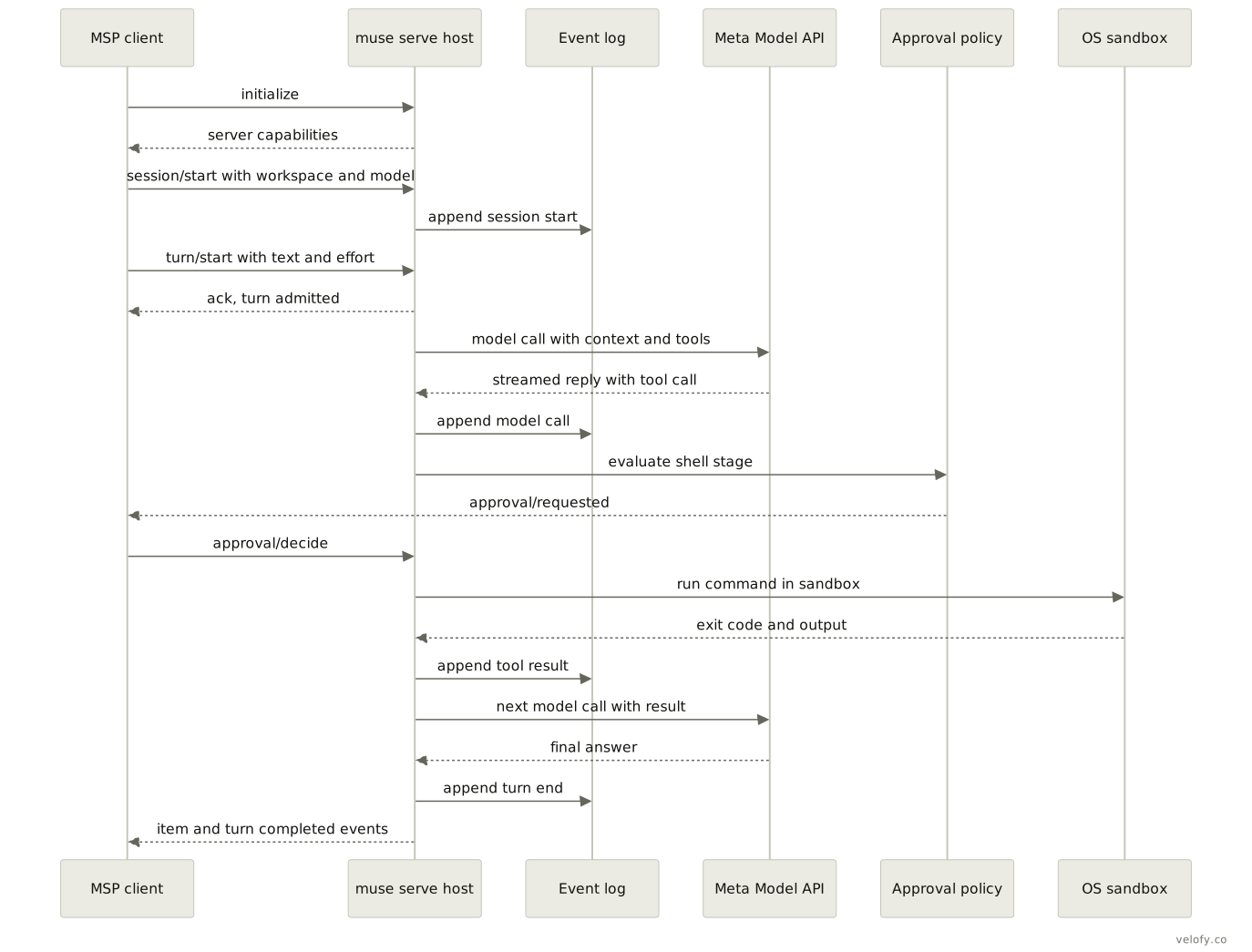
Protocol surface. The Muse Session Protocol (MSP) is newline-delimited JSON-RPC (remote procedure call) 2.0 over stdio. A client sends initialize, session/start with a workspace and model, then turn/start; the host acknowledges admission and streams item and turn events. Approvals are a real exchange (approval/requested, approval/decide, approval/resolved). Sandbox posture is fixed when muse serve starts and cannot be changed over the wire, while approval mode is set over the wire. muse schema exports the exact JSON Schema or TypeScript types for the installed binary. The MIT-licensed SDK wraps this protocol.
Model Context Protocol (MCP). MCP servers are declared under mcp_servers in settings, over stdio or streamable HTTP, with OAuth 2.1 login through muse mcp login. Each server can be marked required or optional. MCP tools run outside the sandbox; approval still applies.
Sandboxing and safety. Three approval modes exist: on-request (default), untrusted and never. Four permission profiles sit on top: Ask me, Auto-review, Unrestricted and Read-only. Auto-review uses a model-based approval judge, which is on by default. Shell commands are parsed into stages and checked against rules. The OS sandbox uses Seatbelt on macOS and bubblewrap on Linux, allows writes only to the workspace and temp directory, and keeps .git, .muse and .agents read-only so the agent cannot rewrite its own rules. Network defaults to proxy-only, which asks about each new host, port and protocol. --yolo removes both approval and sandbox.
State and storage. User settings are JSON at ~/.config/muse/settings.json with a required schema_version. Project instructions come from AGENTS.md or CLAUDE.md, deepest file winning. On our machine, sessions are stored under ~/.local/share/muse/sessions/<year>/<month>/<day>/<id>/ as session.jsonl, with a SQLite session index alongside. Those paths are observed, not documented.
Extensibility. Skills are folders with a SKILL.md, loaded from built-in, user, project (.agents/skills/) and plugin sources, and can be imported from Claude Code. Hooks cover 15 documented lifecycle events, including PreToolUse, PreLLMCall and PreCompact; they run outside the sandbox in a cleared environment. Plugins are bundles with marketplaces, trust approval per capability, and a hook test runner. Enterprise admins can validate managed defaults and policy files with muse config validate.
Observed limits. Session messaging is not available on Windows. Linux sandboxing fails closed without working bubblewrap. Long muse exec runs have hit a 180-second model stream idle timeout, per a public SDK issue.
Entity relationships


An account trusts workspaces and is billed for model use. A workspace hosts many sessions. Each session has exactly one append-only event log, which is the record that resume, export and rewind are built from. A session is made of turns; each turn is served by one model and can issue many tool calls. A permission profile governs the session and decides, for each tool call, whether it runs, is held for a person, or goes to the approval judge. Sessions spawn subagents, and a subagent may get its own Git worktree. Sessions load skills and connect to MCP servers, both of which widen the tool set the model sees.
Architecture


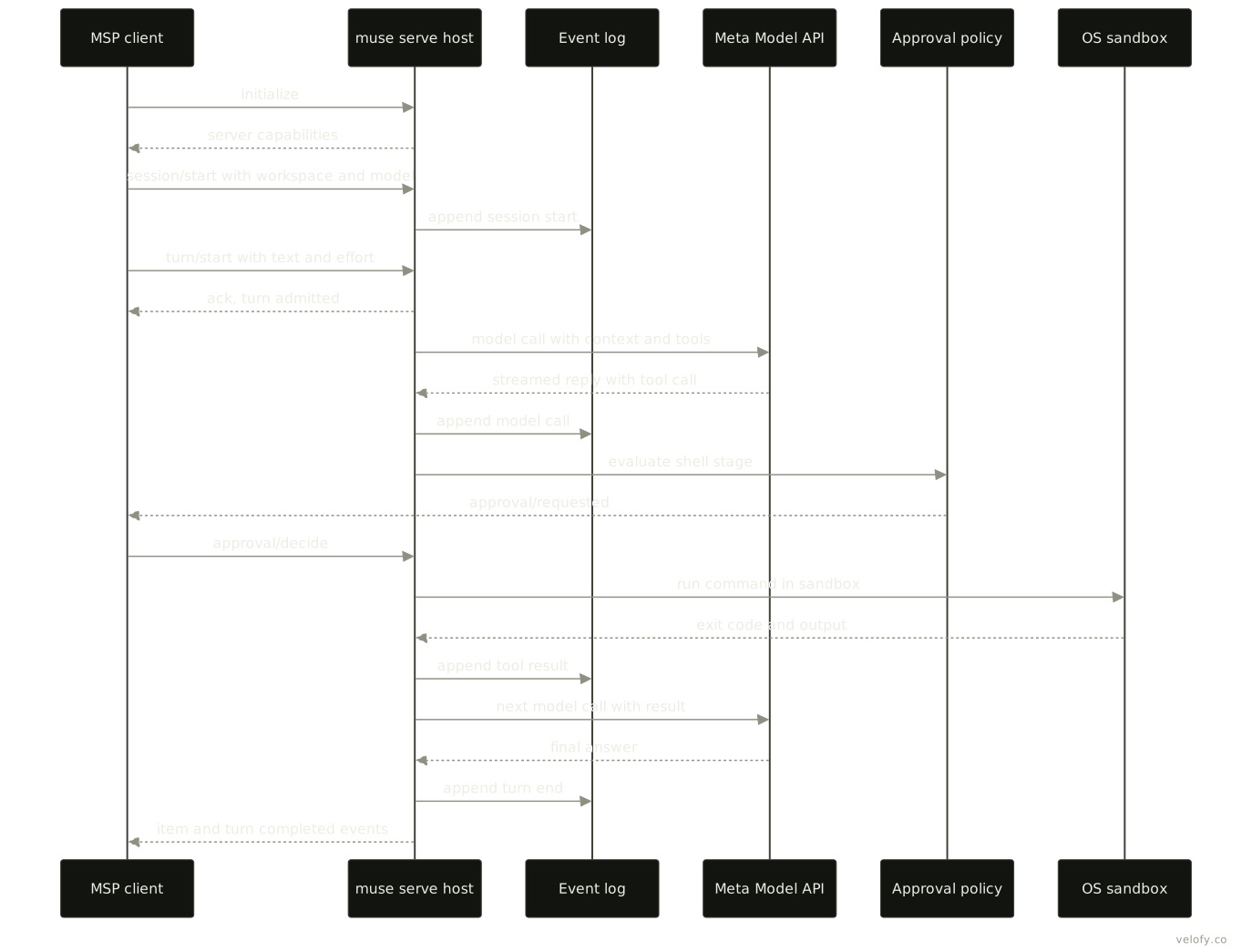
Take one request from a harness. The launcher has already confirmed the binary is current and checksummed. The harness starts muse serve, which fixes the sandbox posture for its lifetime, and opens a session against a workspace. It sends a turn. The runtime appends the turn to the event log and calls the Meta Model API with the context and tool list. The model replies with a tool call, say a shell command. The policy layer parses the command into stages; if a stage needs review, the host sends an approval request back to the harness and waits. Once allowed, the command runs inside Seatbelt or bubblewrap, able to write only to the workspace, with any new network host held at the proxy. The result goes into the log and back to the model, which may call more tools, spawn subagents in worktrees, or finish. The host streams completion events to the client.
How it compares
Claude Code, Codex CLI and Gemini CLI are the peers named most often in the sources. All four are terminal agents that read a repository, edit files and run commands under some approval scheme. Muse Code’s differences, as documented, are subagents and background observers on by default, an append-only event log as the source of truth, a published stdio protocol for driving it, and lower list prices. It reads CLAUDE.md files and imports Claude Code skills and memories, which lowers switching cost. An independent reviewer judged Claude Code’s documentation more mature and noted missing compliance attestations at launch.
Against Velofy’s tools: Dexter is also a terminal coding agent with subagents, but it runs any provider’s models, Muse Wonder Full on a Muse Code subscription among them, and its model fans independent work out to up to 8 parallel subagents on its own. Muse Code’s fan-out stays inside one vendor and one model family. For a harness that drives Muse Code itself, muse exec and muse serve give two integration paths, and MSP is the better one when approvals must reach the harness instead of stalling a headless run. Troy is a browser that agents attach to. Muse Code has web search but no documented browser control, so it would need Troy, or an MCP server, for browser work. Meta’s consumer Muse agent, by contrast, has its own hosted browser.
What we could not verify
- Which Model API endpoint (Responses, Chat Completions or Messages) the CLI uses for its own turns.
- What telemetry Muse Code sends, and where event logs or traces go beyond the local disk.
- Whether the CLI will be open-sourced. Several write-ups call the client open source; Meta’s docs, the SDK repository and the closed binary do not support that.
- The exact general availability date (31 August in Meta’s post, 1 September in press).
- Whether the default model is now Muse Spark 1.3; the docs still name 1.2.
- Usage multipliers for the higher plans: Meta’s pages say 5 and 20 times, one trade write-up said 3 and 10 times.
- Whether the V8 workflow engine is now in all public builds.
- The internal architecture, which we read from build strings only.
Sources
- Muse Code overview, Meta Model API docs (read 2026-10-01)
- Muse Code configuration and context (read 2026-10-01)
- Muse Code permissions (read 2026-10-01)
- Muse Code extending: MCP, hooks, skills, subagents (read 2026-10-01)
- Muse Code workflows (read 2026-10-01)
- Muse Code authentication (read 2026-10-01)
- Muse Code interactive sessions (read 2026-10-01)
- Muse Code subscriptions (read 2026-10-01)
- Muse Code changelog (read 2026-10-01)
- Muse Code product page (read 2026-10-01)
- Muse Code: New plans and features, Meta blog (read 2026-10-01)
- Meta Model API reference (read 2026-10-01)
- Introducing Muse Code and Muse Spark 1.2, Meta (read 2026-10-01)
- Introducing Muse Spark 1.3, Meta (read 2026-10-01)
- Introducing Muse, Meta newsroom (read 2026-10-01)
- muse-code-sdk repository (read 2026-10-01)
- SDK issue 58: stream idle timeout (search listing read 2026-10-01)
- VentureBeat: Meta enters the AI coding wars (read 2026-10-01)
- TechCrunch: Everything new coming to Meta’s AI agent Muse (read 2026-10-01)
- Wikipedia: Muse Spark (read 2026-10-01)
- Enterprise DNA: Muse Code exits beta (read 2026-10-01)
- OrcaRouter: Muse Code maker, cost and version (read 2026-10-01)
- Layer3 Labs: Muse Code review (read 2026-10-01)
- Casys: Muse Code and multi-agent architectures (read 2026-10-01)
- Local observation:
muse --help, subcommand help, the launcher script and the 1.4.2-R4684.1 binary on a macOS arm64 machine (read 2026-10-01)