Dots are persistent agents inside ChatGPT. Each one runs on GPT-6 Astra, has its own cloud computer and browser, and keeps working on a user’s goals between conversations. They matter because they move OpenAI’s agent work from “run a task when asked” to “hold a responsibility over weeks”, and OpenAI has published unusually detailed safety and control documentation for that shift.
Facts at a glance
- Maker: OpenAI. OpenAI writes the name in lower case (“dots”, “your dot”); the press mostly writes “Dots”.
- First release: 29 September 2026, announced at DevDay 2026 in San Francisco.
- Current version: launch release, rolling out gradually. No version number is published.
- Licence: proprietary hosted service inside ChatGPT.
- Pricing: first dot included in ChatGPT Pro (Pro 100, Pro 200 and Pro 500 at $100, $200 and $500 a month) and in ChatGPT Business Premium seats ($125 a month, or $100 a month billed annually). Enterprise, Edu and Healthcare get an admin-enabled beta.
- Platforms: created in the ChatGPT desktop app (macOS and Windows) or ChatGPT on a desktop browser; then usable in the mobile app, Slack and Microsoft Teams. Mobile web is not supported.
- Models: GPT-6 Astra. Enterprise model controls do not apply.
- Where it runs: OpenAI’s cloud, on a per-dot Linux computer with Chrome, with optional access to one of the user’s own computers.
First principles
Strip away the branding and a dot is made of five things: a model that proposes the next step, a loop that decides when to wake, memory that carries state between conversations, computers and plugins where actions take effect, and rules about which actions need a person. Each part brings a constraint, and most of OpenAI’s design follows from them.
- The model can be wrong, and it can be steered. Anything it reads, an email or a web page, may contain instructions written by someone else. So the checks cannot live inside the model or inside the sandbox it controls. OpenAI places Auto-review, safety monitoring and the credential service in a separate control plane, and states that a dot cannot use its sandbox access to change or disable those checks.
- Nobody approves every step of an always-on agent. Asking about every action would defeat the point, and asking about none is unsafe. The workable line is consequence. Read-only steps run without review, steps that touch accounts or share information go through Auto-review, and a few, such as changing a password or moving money, always go back to the user.
- Reading and acting should be separate. A task that can only read cannot be talked into a harmful action by what it reads. Proactive research applies this: it is limited in code to read-only tools.
- Secrets in context can leak. Whatever enters the model’s context can end up in its output. Keeping credentials in a private form and a separate store, outside model context, removes that path.
- Persistent state is both the value and the liability. Notes and a long-lived cloud computer let a dot pick up where it left off. They also mean deletion, reset and machine loss need clear rules. Deletion is documented; when a cloud computer is reset or replaced is not.
Product
A dot is a named, customisable agent that a user gives ongoing responsibilities rather than one-off prompts. OpenAI’s examples include keeping an offsite plan current, watching a Slack channel for bug reports and preparing fixes, and updating a study as results arrive. An early tester’s dot noticed a forgotten invoice, drafted it and sent it after he approved.
Setup happens on desktop. The user opens dots in ChatGPT, connects apps such as email, calendar and files, and in the desktop app chooses whether to connect their own computer. The dot introduces itself, reads what it can reach, and suggests where it could help. Users pick a name and an appearance (shape, colour, eyes, glasses, accessories, or a pet). The default handle is @yourname-dot, and naming the dot changes it.
Day to day, the user talks to the same dot through several channels: text and voice calls in ChatGPT on desktop and mobile, direct messages or mentions in Slack, and Microsoft Teams. Changing channel does not create a new dot or reset its memory, but each channel keeps its own visible conversation. The dot decides when to follow up, can wake itself later, can run fixed schedules the user asks for, and can react to events from connected services that support them. A profile page shows work under In progress, Scheduled and Completed, and an Activity view shows delegated tasks.
Launch limits are specific. Each user gets one dot. A dot cannot have its own standalone email address and cannot place calls to the user. Texting is described as coming soon in the main docs and as a limited beta for some United States (US) Pro users in the Help Center. Users must be 18 or older.
How it is sold. Dots are a plan feature, not a separate product. Pro is available outside the European Economic Area, Switzerland and the United Kingdom. Business Premium is available in all supported ChatGPT regions. Enterprise is off by default until a workspace admin enables it. Conversations with the dot do not count toward ChatGPT usage limits; Codex and ChatGPT Work tasks it starts count as normal. OpenAI says plans include an allowance for “deeper work” with extended limits for the first month, and that later users will be able to add dots and buy more speed or monthly work per dot. Post-launch usage terms are not yet published.
OpenAI also previewed specialist dots: dots with their own organisational identity, credentials and access to systems of record, aimed at defined roles such as procurement or invoice processing. These start as engineering-led enterprise pilots, and OpenAI is working with Microsoft to manage them through Agent 365.
What it is compared with. Press coverage set dots against Meta’s Muse, a consumer personal agent launched on 8 September 2026, and Google’s Gemini Spark, a 24/7 agent announced at Google I/O in May 2026. TechCrunch noted that much of the functionality already existed in Codex and similar harnesses, and that dots package it around independent, ongoing work.
Infrastructure
Where it runs. Dots are a hosted cloud service. Each dot has its own cloud computer where it browses, analyses data, creates files and runs tools. OpenAI says it maintains the underlying Linux operating system and Chrome browser, isolates users’ cloud environments from one another, and sandboxes what code and tools can reach inside each workspace. Cloud work continues when the user’s devices are off. OpenAI does not name the hosting provider for these computers.
Hybrid option. A user may connect one personal computer through the ChatGPT desktop app. Access starts off, requires an explicit Allow access step, and can be revoked. The computer must stay online with the ChatGPT app open. With it, the dot can create local ChatGPT Work or Codex tasks, continue existing local Codex tasks, use local skills, and fall back to the local browser when a website blocks the cloud browser. This permission is separate from connecting the same computer to Codex.
Models and services. Dots run on GPT-6 Astra, which OpenAI released on 3 September 2026. The dot calls into other OpenAI products: ChatGPT Work tasks, Codex tasks on a connected machine, and Codex cloud environments the user has already set up with a repository. External services come in through the shared ChatGPT plugin system, which OpenAI says reaches more than 4,000 apps. Slack connection requires the ChatGPT app installed in the Slack workspace. Texting, where available, uses an unnamed third-party provider.
What the user must supply. A Pro or eligible business plan, the desktop app or a desktop browser for setup, plugin connections with their own permissions, and optionally a connected computer. Website logins on the cloud browser are separate from the user’s own browser sessions.
Data handling, as documented. Content is encrypted at rest and in transit. Business, Enterprise and Edu content is not used for training by default. On personal plans, the “Improve the model for everyone” setting governs whether dot conversations, actions and automations may be used. OpenAI does not train directly on proactive research or private notes unless that material enters an eligible conversation. Human review can still happen in limited cases. The dot’s context does not keep credentials, images or screenshots. Enterprise admins can investigate dot messages through the Compliance application programming interface (API) and track adoption through the Analytics API. If any cloud policy enforces data residency, local-computer access is unavailable.
Engineering
Components. From the documentation, a dot has five working parts: a coordinating agent the user talks to; background agents it spawns to work in parallel; proactive research tasks; execution environments (the cloud computer, plugins, Codex and Work tasks, a connected computer); and a separate control plane holding Auto-review, safety monitoring and a credential service. OpenAI states that dots run code in environments separate from the systems that coordinate their work and enforce safeguards, so a dot cannot use its sandbox access to change or disable those checks.
The agent loop. The dot works between conversations: it tracks progress, decides what happens next, and chooses when to pause and wake. The system card describes a time-budget setting combined with reasoning effort, tested with simulated budgets from four minutes to one year using a clock tool that can wait. Work is often divided among background agents that report back to the coordinator, and the dot can open visible cloud threads that appear as separate ChatGPT conversations. A delegated task gets instructions and context from the dot, not its whole history.
Context and memory. Three layers are documented. Conversation context is a selection of messages, instructions, sources and tool results for the current turn, and calls may use a different selection from background work. ChatGPT memory flows into the dot and the dot’s conversations can feed back into ChatGPT memory. The dot also keeps its own notes on preferences, decisions and ongoing work, separate from ChatGPT memory. Users cannot view or edit individual notes; the only way to clear them is to delete or reset the dot.
Tool surface. Plugins are the main extension point. A plugin can bundle skills (reusable instructions), Model Context Protocol (MCP) servers that define tools and enforce authentication, browser extensions and hooks. Plugin permissions are shared across dots, ChatGPT, ChatGPT Work and Codex, so a user can, for example, allow reading email but not sending. Beyond plugins the dot uses computer use on its cloud machine, Codex cloud environments and local tasks. OpenAI does not publish the dot’s tool schemas, and we found no public API for creating or driving a dot. The separate Agents API announced at the same DevDay is not documented as a way to reach dots.
Permissions and approvals. Actions pass through four layers: built-in action rules, plugin permissions, optional Custom Rules, and Auto-review. Custom Rules attach one of four behaviours to a described action: take action without asking, take action when the user explicitly says so, ask first, or hand off to the user. Some steps can never be delegated: changing a password and moving money between financial accounts always go back to the user. Permanent deletion, installing unrecognised software and granting new security-sensitive access need confirmation each time. Purchases use cards saved on merchant sites and need approval. Sharing rules scale with data sensitivity: health data needs a named recipient, while lower-sensitivity data like an email address can go to a class of recipient.
Auto-review. Before actions that touch accounts or share information, a separate reviewer model checks the proposed step against the user’s instructions, Custom Rules and safety requirements. If it blocks, it returns a reason and the dot may ask the user, try a permitted alternative, hand the step back, or stop. User approval cannot override core safety requirements, and read-only steps skip this review. The system card says OpenAI adapted Codex’s Auto-review protocol for dots by adding dots-specific instructions to the reviewer policy, and dots use a custom confirmation policy that ranks above other instructions more strongly than in the Codex harness.
Monitoring and injection defences. A misalignment monitor watches plans and actions and can pause work and warn the user. Production monitoring assigns priorities, and a top-priority (P0) alert pages OpenAI’s security team. Proactive research is limited in code to read-only tools: it cannot send messages, change app content or control a browser or computer. In the system card’s prompt-injection test, 100 rollouts each received 500 simulated emails including 166 machine-generated attacks, and OpenAI scored no successful attacks. Its chained-task test found moderate scope violations rising from 8.6% to 19.7% of samples as intervening tasks doubled from five to ten.
Credentials. For supported sign-ins, the model pauses while the user fills a private form; credentials go straight to the remote browser and never enter model context. Saved passwords come from a dedicated encrypted credential service, and reusing a saved login needs confirmation. A password pasted into chat is not protected by this path.
State and storage. The cloud computer can keep files, installed software and browser sessions between uses. One community report on 1 October 2026 describes a dot’s machine losing installed apps and logins without explanation, and OpenAI has not documented reset triggers. Deleting a dot removes its own context, conversations, notes and schedules, but not files, Codex threads or ChatGPT conversations it created elsewhere, and not actions already taken. Pause stops only the main task; delegated tasks and schedules are stopped separately.
Admin controls. Workspace owners grant Use dots, Add dots to Slack, local-computer access, and Custom Rules through role-based permissions, plus cloud browser use, cloud network access, cloud computer use and the password manager.
Entity relationships


The User owns at most one Dot at launch, and in business plans a Workspace decides whether that user may have one. Each dot has exactly one Cloud computer, which holds its own Browser sessions, and may be linked to at most one Local computer. The dot is reached through several Channels (ChatGPT, voice, Slack, Teams), which all point at the same dot. It uses Plugins only within permissions the user granted elsewhere in ChatGPT. It writes private Notes that persist across channels, delegates Tasks (background agents, cloud threads, Codex or Work tasks), and runs Schedules. Custom rules belong to the user and constrain the dot. Consequential actions from any task become Action reviews, which Auto-review allows or blocks.
Architecture


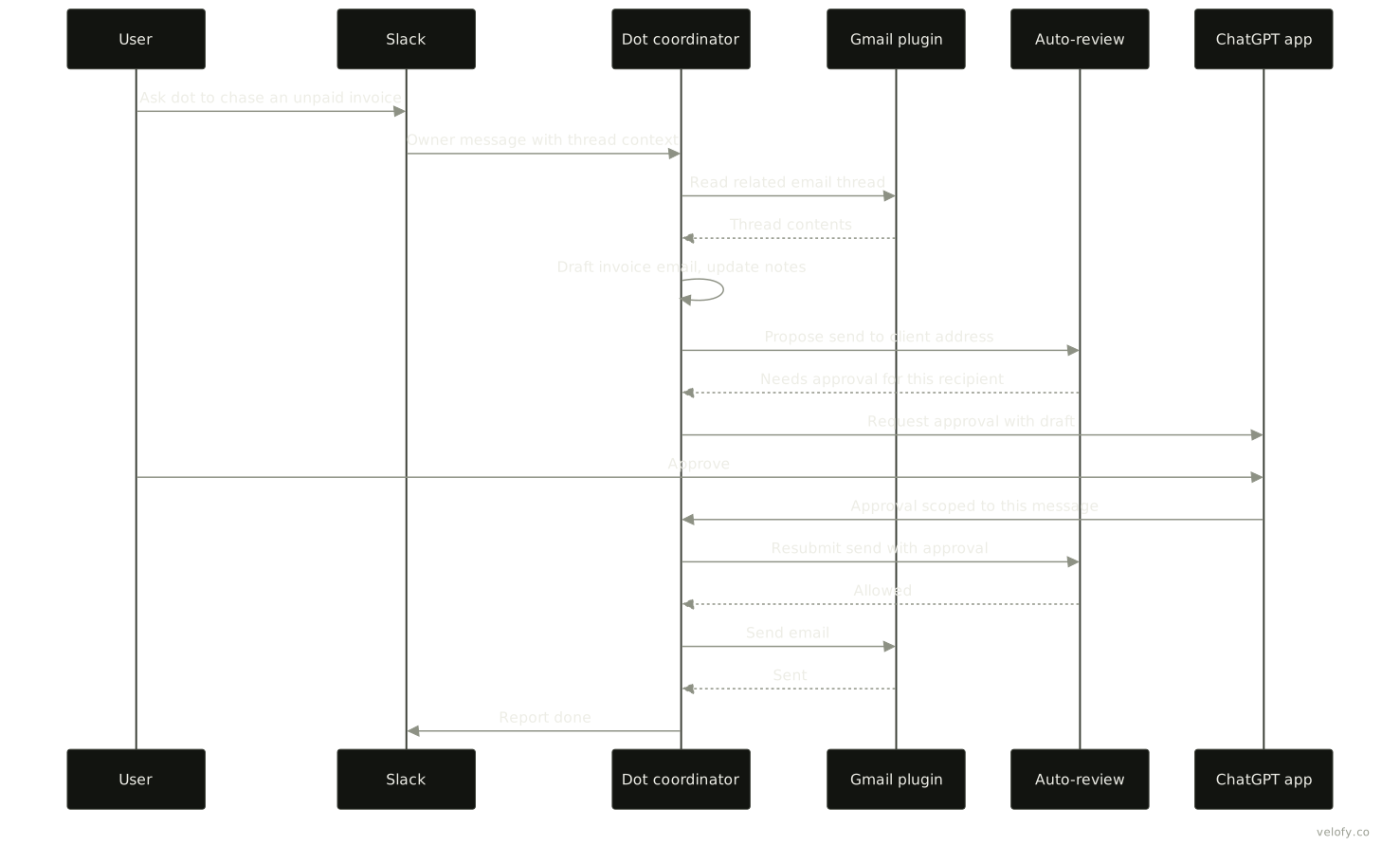
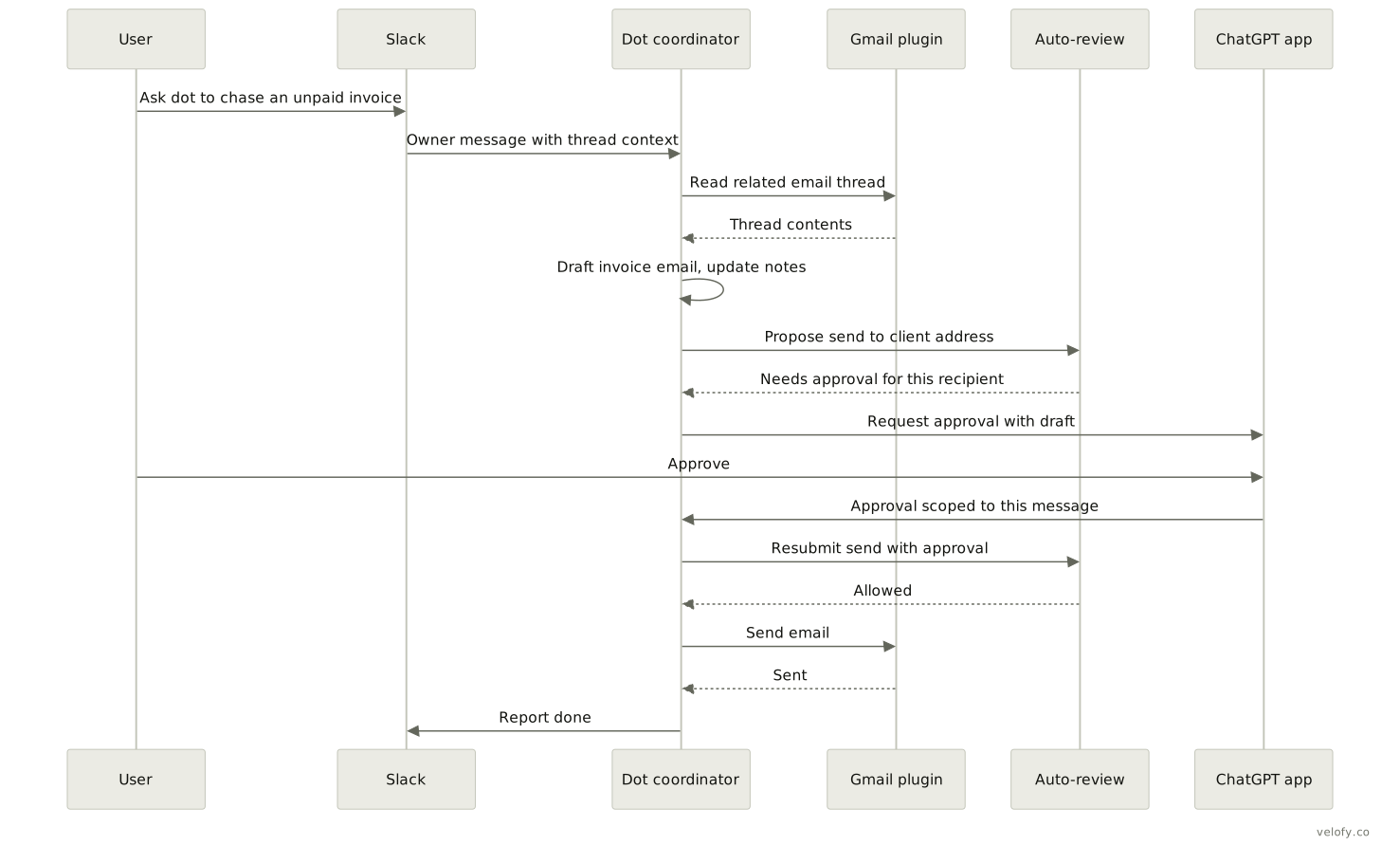
Take one request end to end. A user mentions their dot in Slack and asks it to chase an unpaid invoice. Only the owner can start work this way; other people’s messages are context, not commands. The coordinator combines the message with ChatGPT memory and its own notes, reads the related email through the Gmail plugin (a read action, so no extra review), drafts the email and updates its notes. Sending is consequential, so the proposed send goes to Auto-review with the recipient and message. Drafting does not authorise sending, so review returns that approval is needed. The dot asks in ChatGPT, the user approves that specific message, and the resubmitted step is allowed. The plugin sends, the result returns to the coordinator, and the dot reports back in Slack. Throughout, the safety monitor can pause the work, and the Activity view shows each step. The diagrams reflect documented behaviour; the exact routing of the approval prompt between channels is our reading of the docs.
How it compares
| Product | Runs on | Control model | Reach |
|---|---|---|---|
| OpenAI dots | Per-dot cloud computer, optional local link | Built-in rules, Custom Rules, Auto-review, monitor | ChatGPT, Slack, Teams; 4,000+ apps via plugins |
| Meta Muse | Muse Secure virtual machine (VM) per user in Meta’s cloud | Separate Sentinel agent approves outbound traffic | Muse app, WhatsApp, web; US launch |
| Google Gemini Spark | Dedicated VMs on Google Cloud | Not detailed in sources we read | Gmail address, Workspace, MCP connectors |
All three run a persistent agent on a dedicated cloud machine and pause for sensitive steps. Muse puts its approval gate in a sibling agent on the same VM; dots put Auto-review and monitoring outside the agent’s sandbox. Dots build on OpenAI’s developer stack (Codex, plugins, MCP), which in our reading suits software and business work; Muse targets consumers and payments.
Against Velofy’s tools: Dexter is a terminal coding agent whose model fans independent work out to its own parallel subagents, up to 8 at once, and can hand a lane to Codex or Claude Code. A dot delegates the same way to its subagents and to Codex, but as a single long-lived agent on OpenAI’s cloud computer. Dexter suits work in a repository on any model; dots suit ongoing ownership. Troy is a browser that outside agents attach to. A dot brings its own cloud Chrome and cannot attach to an external browser, except the user’s local browser through a connected computer.
What we could not verify
- Post-launch pricing and usage allowances. OpenAI says terms will be shared later, and its sources disagree on the first month (see report).
- The hosting provider, region, and isolation technology behind each cloud computer.
- Whether Auto-review for dots runs the same code as the open-source Codex reviewer. OpenAI says it adapted the Codex protocol; the dots-specific policy is not published.
- The dot’s tool schemas, context window, or how notes are stored.
- Cloud computer lifecycle: when a machine is replaced or reset.
- Teams availability: the announcement presents it as available, while the admin guide calls it an invite-only alpha.
- Texting status, and whether the dot can use email as a channel. The system card mentions email and text follow-ups; the Help Center says no standalone email address at launch.
- Any independent hands-on review beyond launch coverage. As OpenAI puts it, “Dots can still make mistakes, so always review consequential work.”
Sources
- Introducing dots, OpenAI (read 2026-10-01)
- How we build safety, security, and privacy into dots, OpenAI (read 2026-10-01)
- DevDay 2026 Recap, OpenAI (read 2026-10-01)
- Getting started with your dot, OpenAI Help Center (read 2026-10-01)
- Dots privacy, security, and safety FAQs, OpenAI Help Center (read 2026-10-01)
- ChatGPT release notes, OpenAI Help Center (read 2026-10-01)
- About ChatGPT Pro tiers, OpenAI Help Center (read 2026-10-01)
- ChatGPT Business overview, OpenAI Help Center (read 2026-10-01)
- ChatGPT pricing (read 2026-10-01)
- Meet dots, ChatGPT Learn (read 2026-10-01)
- Get started with your dot, ChatGPT Learn (read 2026-10-01)
- Message your dot, ChatGPT Learn (read 2026-10-01)
- Tasks and memory, ChatGPT Learn (read 2026-10-01)
- Connect computers and apps to your dot, ChatGPT Learn (read 2026-10-01)
- Control your dot, ChatGPT Learn (read 2026-10-01)
- Manage dots permissions and capabilities, ChatGPT Learn (read 2026-10-01)
- Plugins, ChatGPT Learn (read 2026-10-01)
- Auto-review, ChatGPT Learn (read 2026-10-01)
- Auto-review of agent actions, OpenAI Alignment (read 2026-10-01)
- GPT-6 Astra System Card, section 12: Dots, OpenAI Deployment Safety Hub (read 2026-10-01)
- OpenAI Developer Community: dot cloud computer lost installed apps and logins (read 2026-10-01)
- TechCrunch: OpenAI launches Dots (read 2026-10-01)
- The Next Web: OpenAI launches dots (read 2026-10-01)
- BetaNews: OpenAI launches dots (read 2026-10-01)
- Bloomberg: OpenAI unveils always-on AI agent Dots (read 2026-10-01, paywalled, summary only)
- 9to5Google: OpenAI launches Dots (read 2026-10-01)
- PYMNTS: OpenAI launches Dots (read 2026-10-01)
- Yahoo Finance: OpenAI debuts Dots (read 2026-10-01)
- DataCamp: OpenAI Dots explained (read 2026-10-01)
- Meta: Introducing Muse (read 2026-10-01)
- TechCrunch: Google introduces Gemini Spark (read 2026-10-01)